Chapter 8: A Practical Alternative - MaxDiff
This chapter introduces Maximum Difference Scaling, or MaxDiff, as a reliable and user-friendly method for figuring out what your customers' unmet needs are. We'll show you how it directly solves the problems with the old opportunity algorithm we discussed in Chapter 7 and give you a complete hands-on guide to using it for your own research.
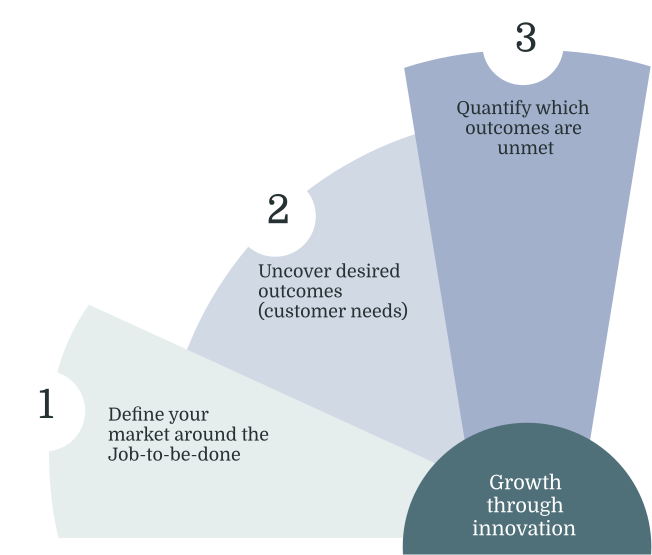
Review of Chapter 7
In the last chapter, we saw how the traditional opportunity scoring algorithm, while well-intentioned, has some potential concerns. Double weighting importance, losing information by grouping ratings, and asking people too many questions all lead to unreliable results. At best, this can hide what your customers really care about. At worst, it can send your team chasing after phantom opportunities based on survey noise. This leaves us with a key question: how can we figure out customer needs in a way that is both statistically sound and practical?
The answer is to stop asking customers for abstract ratings and start asking them to make realistic trade offs. This is the simple idea behind a method called Maximum Difference Scaling, or MaxDiff. Instead of asking a customer to rate the importance of 100 different need/outcome statements on a five point scale, a mentally draining task, MaxDiff presents a much simpler request. It shows people small sets of items and asks them to make a straightforward choice: "Of this list, which is the most important and which is the least important?"
This one change fixes the major flaws of the old approach. By forcing a choice, MaxDiff avoids the biases that come with rating scales and gives you a true hierarchy of priorities. It mimics how people make decisions in the real world by comparing options and deciding what matters more. The result is a cleaner, more reliable, and more precise picture of what your customers truly value.
This chapter is your hands on guide to MaxDiff. We will walk step by step through how to design, run, and analyze a MaxDiff study for your JTBD and ODI research.
What is MaxDiff? A Simple Explanation
At its heart, MaxDiff is a way to understand what really matters to people by asking them to make simple, repeated choices. It breaks down the overwhelming task of rating many items into something much more manageable and human.[37]
The Basic Idea
Imagine you want to know which iPhone features a group of friends thinks are most important. The old survey approach would be to list several features and ask your friends to rate each one on a scale of 1 to 5.
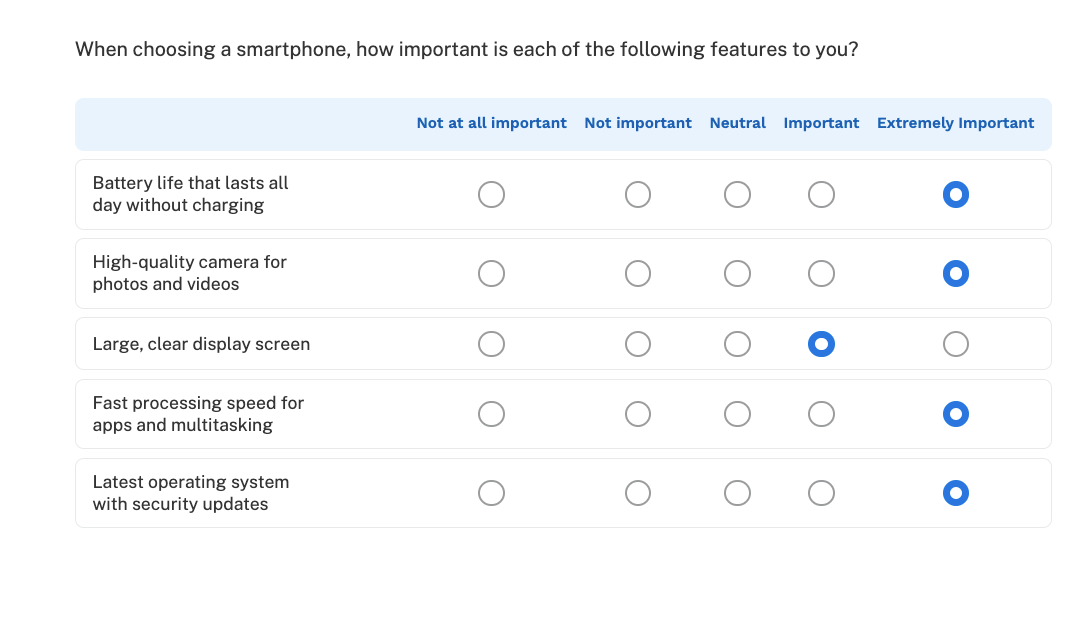
You would almost certainly get a lot of 4s and 5s for popular items like "battery life," "high quality camera," and "faster processor," but you wouldn't know which of those is the most important.
Formally known as Best-Worst Scaling and developed by Jordan Louviere, MaxDiff works differently. [24] Instead of that long list, you would show your friends just four or five features at a time and ask a simple question: "Of these options, which is the MOST interesting to you, and which is the LEAST interesting to you?"
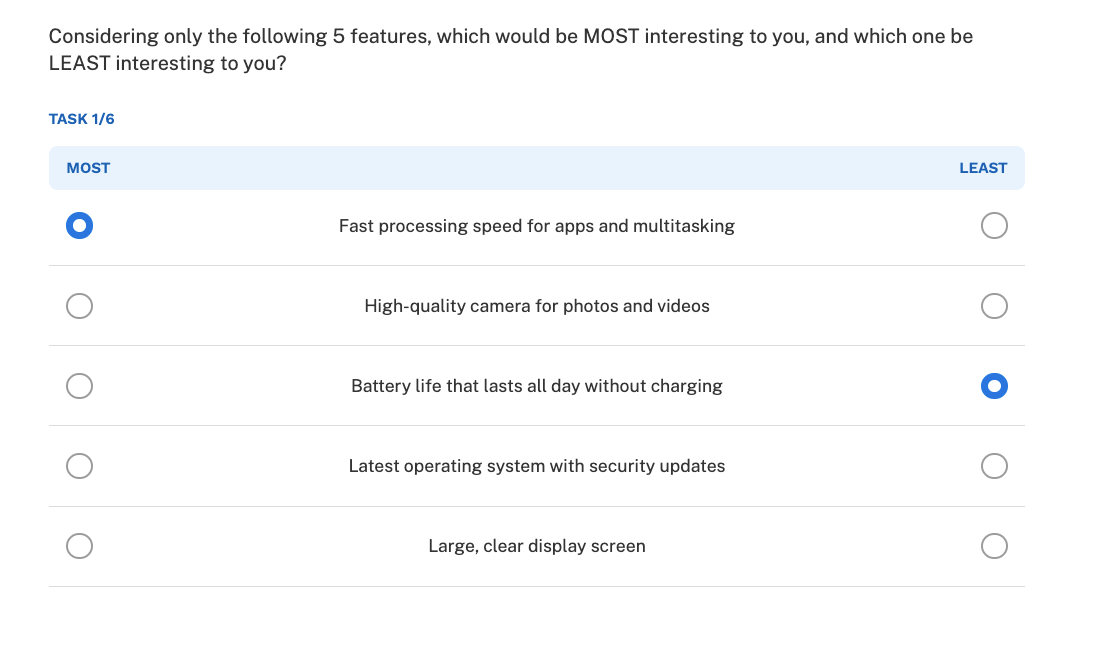
You would then show them a few more sets with different combinations of features. After a dozen or so of these simple choices, a Bayesian analysis running in the background can figure out a complete, ranked preference list for every single feature for each person. The final result is a chart that clearly shows what people value most.
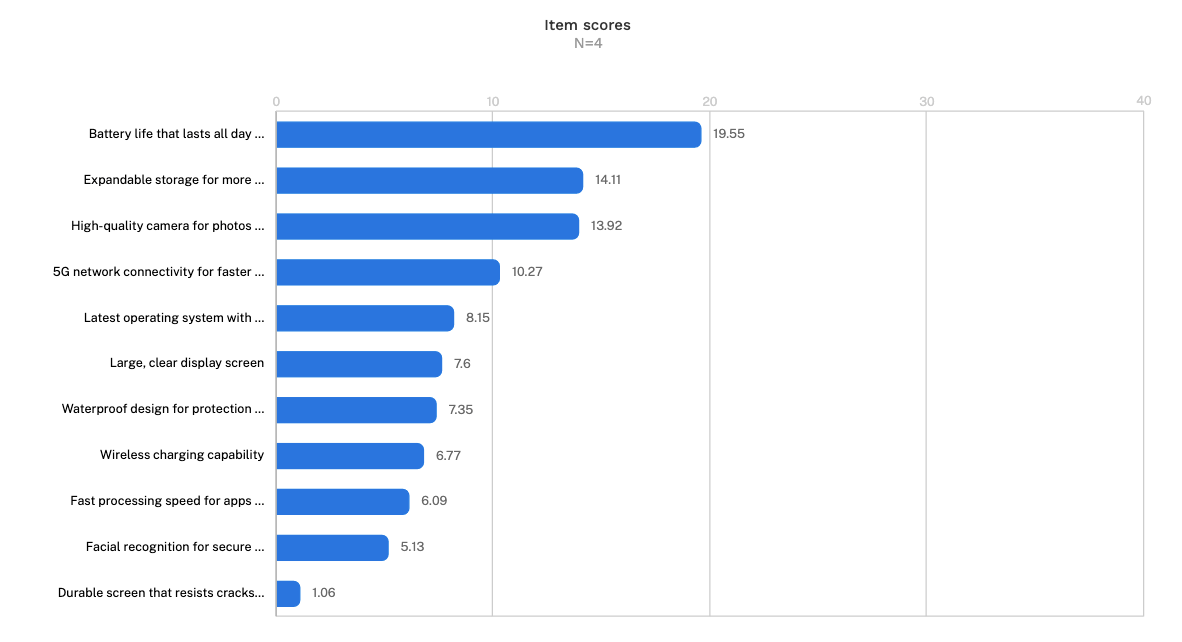
This chart shows what are called "item scores," which are basically preference rankings that come from all those best and worst choices. Here, "Battery life that lasts all day" is the clear winner with a score of 19.55. This immediately tells product managers where to focus. The data also shows smaller differences. For example, "Expandable storage" (14.11) and "High quality camera" (13.92) are close, suggesting they are competing for a similar level of customer interest. This level of detail helps teams make much smarter trade off decisions.
Why MaxDiff
So why is this simple method of choosing the best and worst so much better than rating scales? It turns out that MaxDiff directly solves the problems we identified in the last chapter.
-
It Avoids Unreliable Rating Scales. People use rating scales differently. Some people are optimists who rate everything highly, while others avoid the extremes. MaxDiff gets rid of this problem because it relies on comparison, not abstract ratings. It doesn't matter what a "4" means to someone. What matters is what they pick as most and least important, which is a much more consistent and natural way for people to think.
-
It Reduces Survey Fatigue. Rating 100 different items is boring and exhausting. As people get tired, the quality of their answers drops. MaxDiff turns this into a more engaging, puzzle like task. Each question is a new decision, which keeps people more focused. This leads to higher completion rates and better data from start to finish.
-
It Keeps the Math Simple and Clean. The old opportunity formula mixed importance and satisfaction scores in statistically questionable ways. MaxDiff analysis, on the other hand, produces a single set of utility scores. These scores are on a relative, interval scale, meaning the distance between them is meaningful. For easier interpretation, these raw scores are often rescaled to a common scale, such as 0 to 100. When rescaled this way, an need with a score of 20 is twice as preferred as one with a score of 10, creating a clear and intuitive ranking of customer needs without any complex formulas.
-
It Uses All the Information. Grouping ratings of 4 and 5 together, known as "top two box" analysis, discards valuable information. A passionate "5" gets treated the same as a lukewarm "4." MaxDiff uses every single choice a person makes to build its model. This allows it to make fine distinctions between needs that are close in importance.
-
It's More Efficient. MaxDiff gives you more reliable results with fewer people. Because each person makes many choices, a 200 person MaxDiff study can generate as much useful data as a traditional rating study with 400 or 500 people. This makes your research faster and more affordable.
The Measurement Decision: What Should Your MaxDiff Actually Measure?
Before we dive into building a MaxDiff survey, we have to address a key decision. It depends on what dimension you ask people to evaluate.
Traditional ODI requires measuring both importance and satisfaction for every need, then combining them through the opportunity algorithm. We have already discussed the problems with that approach: survey fatigue from rating 100+ items twice, the double-weighting of importance in the formula, and the false precision of the resulting scores.
MaxDiff solves the fatigue problem by using forced choices instead of ratings. But you still face a decision about what dimension to measure, and this decision matters more than you might think.
The "Importance" Trap
When trying to understand customer needs, our first instinct is often to ask about importance: "Which of these needs is most important to you?" Unfortunately, this usually leads to a "ceiling effect," where almost everything is rated as highly important, and you cannot tell what to focus on.
For example, imagine a hospital trying to improve the patient experience. If they ask patients to prioritize needs like these:
- Having medical staff take my symptoms seriously
- Getting diagnostic test results quickly
- Understanding my treatment plan clearly
- Having nurses respond promptly to requests
Almost every patient would say all of these are "important." They are all fundamental to good healthcare. The results would be a flat, undifferentiated list of priorities, giving the hospital no direction on where to improve.

In professional research, we call this the problem of "Stated Importance." When you ask people what they want, they say everything. This is why many researchers advocate moving toward "Derived Importance," where we uncover what matters by analyzing the choices people make rather than the ratings they give.
MaxDiff helps with this by forcing trade-offs, but the framing of your question still matters enormously. Ask people which needs are "most important" and you may still get clustering at the top. Ask them which problems are "most frustrating" or which improvements would "make the biggest difference" and you often get much cleaner separation.
To avoid the importance trap and get actionable data, you have four realistic approaches to consider.
Option 1: MaxDiff on Importance, Then Targeted Satisfaction
You run your MaxDiff study asking customers to identify which needs matter most to getting their job done. This gives you a clear hierarchy of importance. Then you add a short follow-up section (not a second MaxDiff, just 10-15 simple satisfaction rating questions) covering only the needs that ranked in your top tier.
This approach preserves the gap analysis logic of ODI while dramatically reducing survey burden. Instead of rating satisfaction on 100 items, customers only evaluate the 15-20 that the importance ranking identified as priorities. You get both dimensions without the exhaustion.
The downside is added survey length and complexity. Even a short satisfaction section adds time. You also need to design conditional logic so the satisfaction questions reflect each respondent's importance rankings, which requires more sophisticated survey programming.
Choose this approach if: You have a mature product with established value propositions and need to know not just where to innovate but what to protect. The extra survey complexity is worth it because a misstep (deprioritizing something that turns out to be table stakes) is costly.
Option 2: MaxDiff on Satisfaction Only
You run your MaxDiff asking customers to identify which needs are most poorly served by current solutions, or which problems are biggest. This captures dissatisfaction directly through forced choice.
Customers will not identify something as a major problem unless it matters to them. If someone does not care about a capability, they are unlikely to flag it as their biggest pain point even if current solutions handle it poorly. Dissatisfaction, the argument goes, implicitly signals importance.
This is often true, but not always. There are scenarios where satisfaction alone can mislead you.
A customer might express dissatisfaction with something they rarely use and do not actually value. They tried your dark mode once, thought it looked terrible, and now report dissatisfaction. But they never use dark mode and would not care if it improved. If you only measure satisfaction, this noise can look like signal.
More significantly, satisfaction-only measurement makes it difficult to identify your table stakes: the needs that are currently well-served. These are things you must not regress on. High satisfaction might tempt you to deprioritize maintenance or take quality for granted, not realizing that any degradation would cause damage. Without some importance signal, you lose visibility into what you need to protect, not just what you need to fix.
Choose this approach if: You are focused purely on identifying pain points and have other signals (support tickets, churn analysis, customer health scores) to help you understand what existing value you need to protect.
Option 3: Combined Framing (Recommended for Most Teams)
The most practical approach for most teams is to frame your MaxDiff question in a way that captures both dimensions simultaneously.
Instead of asking "Which of these is most important?" or "Which of these are you least satisfied with?", you ask something like:
- "Which of these unmet needs would make the biggest difference if solved?"
- "Which of these is the most important problem you currently face?"
- "Which of these improvements would have the greatest impact on your ability to get your job done?"
This framing implies both importance (it would "make a difference" or have "impact") and dissatisfaction (it is an "unmet need" or "problem"). You are asking customers to prioritize based on the gap between what matters and what is working, which is exactly what the opportunity concept tries to capture, but in a single, natural question.

The trade-off is that you lose the ability to cleanly separate the two dimensions. You cannot say with precision "this need is highly important but already satisfied" versus "this need is moderately important but completely unmet." The combined framing blends these into a single priority signal.
For most product decisions, this blended signal is sufficient. You want to know where to focus. The combined framing tells you: focus here, where importance and dissatisfaction intersect. The cases where you would make a different decision with separated data are relatively rare.
Choose this approach if: You are an early-stage product still searching for product-market fit, or you need to identify the most important unmet needs quickly. The nuance of separating importance from satisfaction matters less than speed and clarity.
Option 4: Relevant Items MaxDiff
When your need list is large and relevance varies across respondents, Relevant Items MaxDiff offers an elegant solution. Before the MaxDiff exercise begins, respondents complete a quick screener indicating which needs are actually relevant to their situation. The MaxDiff tasks are then built only from those relevant items.
For example, if you are researching the job of "plan a vacation," a business traveler might indicate that needs related to "entertaining children during travel" or "finding family-friendly accommodations" are not relevant. Those needs would be excluded from their MaxDiff exercise entirely, reducing cognitive load and eliminating noise from forced evaluations of irrelevant items.
This approach offers several advantages:
- Reduced respondent burden. Instead of evaluating 80 needs, a respondent might only see the 25-30 that apply to them.
- Cleaner data. You avoid the noise that comes from respondents guessing or satisficing on needs they have never experienced.
- Relevance as signal. The selection of relevant items itself becomes valuable data. You can analyze which needs different user types consider relevant before even looking at the utility scores.
Handling the analysis. When running HB estimation on Relevant Items MaxDiff data, you need to decide how to treat items that were not shown. If respondents explicitly marked items as "not relevant," you would typically use the "Missing Inferior" setting, which treats those items as systematically less preferred than the items they did select. This prevents the model from imputing neutral or positive utilities for needs the respondent indicated do not apply to them.
The segmentation trade-off. Traditional MaxDiff segmentation clusters respondents based on their utility scores across identical item sets. With Relevant Items MaxDiff, segmentation works differently:
- You can segment based on relevance patterns: which needs did different user types select as relevant? This can reveal fundamentally different job contexts or user segments before you even analyze preferences.
- You can segment based on utilities within shared items: for respondents who selected overlapping relevant items, you can still cluster based on how they prioritized those shared needs.
- You may need to combine approaches: use relevance patterns for initial segmentation, then analyze utility differences within each segment.
This is genuinely messier than traditional MaxDiff segmentation. If two respondents have no overlapping relevant items, you cannot directly compare their preferences. You would need to rely on the relevance selection patterns or external variables (demographics, behaviors) to group them.
Choose this approach if: You have a large needs list (50+) where relevance genuinely varies by user type, you are comfortable with segmentation based on relevance patterns rather than pure utility comparisons, and you suspect your market contains fundamentally different user segments with different job contexts. It is particularly powerful when the relevance selection itself is strategically interesting (for example, discovering that enterprise buyers consider an entirely different set of needs relevant than SMB buyers).
Be cautious if: You need clean utility comparisons across your entire sample, your segmentation strategy depends on clustering everyone based on the same items, or your needs are universally relevant to anyone doing the job.
Option 5: Feature-Based MaxDiff
If your team has already moved past discovery and has a concrete list of feature concepts, you can skip the needs layer entirely and ask customers to prioritize features directly.
The question becomes straightforward: "Which of these features would you most want us to build?" or "Which of these improvements would be most valuable to you?" This approach offers practical advantages:
Immediately actionable. The output is a prioritized feature list that can directly inform your roadmap without additional translation.
Speaks the language of stakeholders. Engineers, executives, and product managers naturally think in features. Research framed this way is easier to communicate and act on. Reduces abstraction. You avoid the sometimes awkward process of translating ranked needs into features after the research.
However, this approach has clear limitations:
You are testing solutions, not problems. If a feature ranks low, you cannot tell whether the underlying need is unimportant or whether your feature concept simply failed to resonate. You might abandon a valuable opportunity space because your first solution idea was weak.
You constrain your innovation space. Needs-based research can reveal opportunities you have not considered. Feature-based research only validates or invalidates ideas you have already generated. Features bundle multiple needs. A single feature often addresses several needs, making it hard to interpret what the ranking actually tells you about underlying priorities.
Choose this approach if: You are in execution mode rather than discovery mode, you have high confidence that your feature concepts are good solutions to real needs, and you need to prioritize a backlog quickly. This works best as a complement to earlier needs-based research, not a replacement for it.
Be cautious if: You are still in early discovery, you want to understand the problem space before committing to solutions, or you suspect your current feature ideas might not be the best ways to address customer needs.
I would be cautious about positioning it as equivalent to the other four. The other options are all variations on measuring needs (with different framings around importance, satisfaction, or relevance). Feature-based MaxDiff is measuring something fundamentally different: preference for proposed solutions. Another way to think about it: Options 1-4 help you figure out where to focus. Feature-based MaxDiff helps you figure out how to execute once you have already decided where to focus. They answer different questions at different stages of the product development process.
Choosing Your Approach: A Summary
A note on feature-based MaxDiff: If you have already completed needs-based discovery and want to prioritize a backlog of feature concepts, you can run MaxDiff on features directly. This gives you immediately actionable output but answers a different question: "which solution should we build?" rather than "which problem should we solve?" Use this as a follow-up to needs research, not a replacement for it.
Why This Changes Prioritization Conversations
Regardless of which option you choose, MaxDiff outputs create different conversations than traditional ODI scores.
Traditional ODI outputs create a specific problem in prioritization meetings. When you present opportunity scores like 14.7 versus 12.3, stakeholders inevitably ask whether that difference is meaningful. Is a 2.4-point gap worth reorganizing the roadmap? The math looks precise, but as we discussed in Chapter 7, that precision is largely illusory. The honest answer to "does this difference matter?" is usually "it depends," which undermines confidence in the data and opens the door for whoever argues loudest.
MaxDiff outputs sidestep this problem. Instead of debating point differences, you can make a cleaner statement: when forced to choose, customers consistently ranked "data export reliability" above "collaborative editing features." The hierarchy is the insight, not the precise numerical distance between items. You are not claiming that export reliability is exactly 1.4 times more important. You are claiming it wins head-to-head matchups more often, which is a more defensible and intuitive statement.
This changes how prioritization debates unfold. With traditional ODI scores, teams often get stuck arguing about methodology. Is the algorithm right? Is 14.7 really different from 12.3? Should we trust the survey? With ranked preferences from forced choices, the conversation shifts to strategic questions that matter:
- Should we address the top-ranked need first, or is there a cluster of related needs in positions two through five that we could solve together more efficiently?
- The third-ranked need is technically lower priority, but it is much easier to build. Could we capture a quick win while we plan the larger effort?
- Our enterprise segment shows different rankings than our SMB segment. Should we build different solutions or find the common thread?
These are productive debates about strategy and resources, not arguments about survey statistics. The methodology becomes invisible, which is what you want. The research should inform decisions, not become the subject of decisions.
The Statement Syntax Decision: Solution-Focused vs. Traditional JTBD Needs Statements
Once you have decided what dimension to measure, you face a second decision: how to write the actual statements. This brings us to a tension between the rigorous principles of Jobs-to-be-Done theory and the practical realities of survey design.
A core tenet of JTBD is to remain solution-agnostic, focusing exclusively on the customer's desired need/outcome. However, to get clear, quantifiable data from a survey, we sometimes need to bend this rule for the sake of clarity (for the researcher and the respondent).
This is a practical trade-off you often have to make when quantifying needs. JTBD focused need statements are the standard for discovery research, where you are mapping out the job for the first time. But in a quantitative survey, these abstract statements can be hard for people to evaluate, often leading to that ceiling effect where everything seems equally important. To get a clear signal on priorities, you sometimes need to frame the needs in a more concrete way that grounds the respondent in their actual experience.
Option A: Use Solution-Focused Statements
This approach sacrifices theory for practical clarity. It makes the survey much easier for people to answer and gives you clear, actionable insights about performance gaps, even if the statements hint at a solution.
Let us look back at our hospital example. The traditional JTBD need statement might be:
Minimize the time spent waiting for the results of a diagnostic test.
We could change it to the more solution-focused statement:
I receive the results of diagnostic tests in a timely manner.
The second version is far easier for a patient to evaluate. They can think back to their actual experience and quickly decide if they got their blood test results when they expected them. This grounds the question in reality and reduces the mental effort required to answer.
You might notice that "receiving results" sounds like an activity rather than a need. Strict practitioners may argue this violates the rules of defining a need. While true, the statement remains neutral regarding the solution. It does not mention an app, a phone call, or a paper letter. It simply describes the successful completion of the step. In a survey context, the clarity for the respondent is worth this minor shift in language.
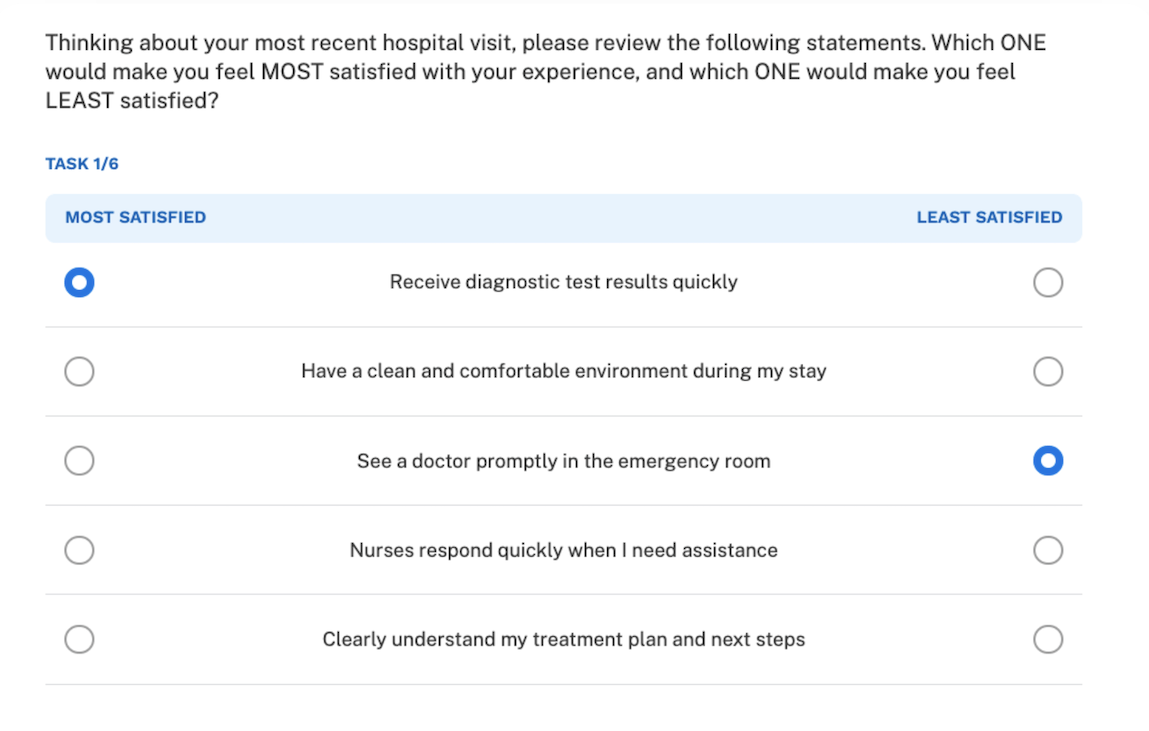
Choose this approach if: Your goal is to identify and prioritize improvements for an existing product or service. It gives you a clear roadmap for optimization.
Option B: Use Traditional Need Statements in a Narrow Context
This approach sticks much closer to JTBD principles. To make abstract needs comparable, you narrow your focus to a theme or step within the larger job, such as "managing a treatment plan." Within this tighter context, you can quantify more granular, tactical needs that are still solution-agnostic. When all the statements relate to the same focused activity, respondents can make more meaningful trade-offs.
For example, if the theme was "understanding the treatment plan," your MaxDiff statements might look like this using the classic, direction-based JTBD syntax:
- Minimize the time it takes to get my questions about the plan answered by a doctor.
- Minimize the confusion caused by medical jargon used by staff.
- Minimize the difficulty of remembering all the steps in my treatment plan.
- Minimize the likelihood of feeling rushed when discussing the plan.
As we discussed in Chapter 6 with JTBD and ODI syntax, if this rigid syntax feels too restrictive or unnatural for a survey, you can rephrase these statements using more conversational language. The goal is to remain focused on the need, not the solution. Here is how the same needs could be written in a more flexible style using words like quickly, easily, or avoid:
- Quickly get my questions about the plan answered by a doctor.
- Avoid confusion from the medical jargon used by staff.
- Easily remember all the steps in my treatment plan.
- Avoid feeling rushed when discussing the plan.
Notice that in both formats, all of these statements are traditional need statements. They describe what the patient wants to achieve without mentioning a solution, but they are all related to a particular part of the patient's journey or a job step in the job map. This narrow focus makes the trade-off ("What is more frustrating: the medical jargon or feeling rushed?") a realistic choice for the respondent.
Choose this approach if: You are doing foundational research to deeply understand a part of the customer's job. It is ideal for uncovering opportunities for breakthrough innovation rather than just incremental improvements.
Combining the Two Decisions
To summarize, you are making two independent decisions when designing your MaxDiff:
- What dimension to measure: Importance only, satisfaction only, or combined framing
- How to write statements: Solution-focused for clarity, or traditional JTBD need syntax for methodological rigor
These choices are orthogonal. You can use combined framing with solution-focused statements (practical and clear) or combined framing with traditional JTBD need statements (rigorous but requires narrow scope). The right combination depends on your research goals, your product's maturity, and the cognitive load you are willing to place on respondents.
The broader point is that there is no single correct approach. The original ODI methodology presents itself as a precise system, but as we have seen throughout this book, that precision often obscures judgment calls and trade-offs. MaxDiff is a better tool, but it is still a tool. You have to decide how to wield it based on your context, resources, and risk tolerance.
What matters is that you are measuring customer needs through forced trade-offs rather than inflated ratings, that you are producing a clear hierarchy rather than a spreadsheet of similar-looking scores, and that you are designing your research to answer the strategic questions your team actually faces, not just following a methodology because someone said it works.
A Practical Guide to Building Your MaxDiff Study
With that decision made, we can now walk through the mechanics of creating an effective MaxDiff study. Getting this right comes down to three things: the study design, the quality of your statements, and the experience you create for the person taking the survey.
A quick note on tools: You'll find many great platforms out there to run a MaxDiff study, including tools like Qualtrics, Sawtooth Software, Conjointly, and others. Because the specific buttons you click and the exact setup menus change over time and differ between platforms, this guide won't be a detailed tutorial for any single piece of software. Instead, we will focus on the universal principles and platform-agnostic steps that are essential for a successful study, no matter which tool you choose.
The fundamentals of research design are what truly drive good results, and mastering them will allow you to confidently set up your study on any platform.
Step 1: Write and Test Your Statements
The quality of your data is entirely dependent on the quality of the statements you test.
- Write Clear Statements: Each statement should be short, clear, and contain only one idea. Instead of a complex statement like "A15 Bionic chip with 6 core CPU for faster machine learning," break it down into benefits like "Fast performance for demanding apps" or "Quickly switches between apps."
- Ensure They Can Be Compared: All statements in your list must make sense when compared with each other. A person should be able to make a meaningful trade off between any two statements on your list.
- Pilot Test Everything: Before you launch your study, test your statements. First, have your internal team take the survey. This will catch obvious clarity issues. If you find yourself rereading a statement, your customers will too. After an internal review, test the survey with 20 to 30 people from your target audience. Ask them what they think each statement means and if they found any choices difficult or confusing. Use their feedback to refine your list before the full launch.
Step 2: Design the Study
The statistical setup for MaxDiff is more forgiving than many other methods, but you need to get a few parameters right.
Of course. Here is a more detailed expansion on the three key parameters of MaxDiff study design.
Sample Size: How Many People Do You Really Need?
The goal with sample size is to reach a point of stability, where adding more respondents doesn't meaningfully change the overall ranking of your items.
-
The Baseline (200 Respondents): A sample of 200 is considered a strong baseline because it typically provides enough data to create narrow confidence intervals around your scores. A narrow confidence interval means you can be more certain of the precise score for each item. This makes it easier to declare a "winner" when two items are ranked closely together. With 200 respondents, you can be more confident that a 5-point difference between items is statistically real and not just random noise.
-
The Practical Minimum (50-75 Respondents): Why can MaxDiff work with smaller samples? The answer lies in the Hierarchical Bayes (HB) analysis used to calculate the scores. HB is a sophisticated model that estimates scores for each individual while simultaneously learning from the patterns of the entire group. In simple terms, it "borrows strength" across respondents. If one person's answers are a bit inconsistent, the model uses data from other, similar people to improve its estimate for that individual. This makes the data from each person more powerful, allowing you to get good directional insights (knowing the top 5 items, for instance) even with a smaller group. The trade-off is that your confidence intervals will be wider, so you'll have less precision in the final scores.
-
Segmentation (50+ Per Group): When you want to compare different groups of customers (e.g., new vs. loyal, US vs. Europe), you should treat each group as a mini-study. Aiming for at least 50 people per segment ensures you have enough data to get a reliable read on that group's priorities. If you plan to analyze four segments, a total sample of 200 (50 for each) would be your minimum starting point.
Note on Calculations: The sample sizes listed here are practical rules of thumb that work for the vast majority of commercial projects. If you need to calculate exact power requirements for a complex academic study, I recommend reviewing the technical papers provided by Sawtooth Software, the creators of the standard algorithms used in this field. [39]
Choice Set Configuration: Designing for the Human Brain
This is about managing the cognitive load on your respondents to ensure you get high-quality data from beginning to end.
-
Items Per Set (4 to 5): This range is the sweet spot for human decision-making. When presented with 4 or 5 options, a person can reasonably hold them all in their working memory to make a comparative judgment. If you show 7 or 8 items at once, people get overwhelmed. They can't effectively compare all the options, so they often resort to mental shortcuts, and the quality of their choices declines. The task becomes a chore, and the data suffers.
-
Sets Per Respondent (6 to 8): The biggest threat to data quality in any survey is respondent fatigue. While the MaxDiff task is more engaging than rating scales, it's still repetitive. Experience shows that after about 8 sets, many people start answering on autopilot to get through it. Their response times get shorter, and their choices become less thoughtful. Keeping the task to 6-8 sets ensures you capture high-quality, considered choices from each person. The HB analysis method is efficient enough to build a solid model from this amount of data without needing to push respondents to their limits.
Statistical Coverage: Ensuring a Fair and Accurate Test
Your survey software doesn't just show random items; it follows a precise experimental design to ensure the results are accurate and unbiased.
-
The "Round Robin" Principle: The core goal of the design is to generate enough direct comparisons to build a reliable model. To do this, the design ensures that, across all respondents, every single statement appears in the same set with every other statement multiple times. Think of it like a sports tournament: to get a true ranking, you want every team to play every other team. Since one person can't do all those comparisons, the experimental design spreads these "matchups" intelligently across the entire sample.
-
Balance and Orthogonality: A good design follows two key principles. First is balance, which means every item is shown a roughly equal number of times overall. This ensures that no item gets an advantage by appearing more frequently. Second is orthogonality, which is a technical term for ensuring the items are shown together in a way that lets the model tell their individual preferences apart. It prevents items from always appearing with the same "partner," which would make it hard to know which of the two is driving the choice.
You don't need to build this design yourself. Modern survey platforms handle it automatically. But knowing these principles helps you understand that the background process is a structured, scientific approach designed to give you the cleanest possible read on what your customers value.
Step 3: Build the Survey Experience
How you present the survey to a respondent can dramatically affect the quality of the data you get back. A clear, thoughtful experience encourages focus and honesty, while a confusing one leads to frustration and rushed answers. Here’s a more detailed look at the three key elements for creating a great respondent experience.
Set the Context: Grounding Your Respondent
This is the first thing your respondent should see. Its job is to activate the right memories and put them in the correct frame of mind for your questions. Without proper context, people will answer based on abstract feelings rather than specific, relevant experiences, which makes the data less reliable.
Why this matters: You want them thinking like a "customer who just used your app," not like a "person taking a random survey." A strong context setter acts as a mental warm up.
Practical Examples: The key is to be specific enough to trigger a memory but general enough that most people can easily recall an experience.
- For B2B Software: "Please think about your typical process for completing [Job to be Done, e.g., your monthly expense report] using [Software Name]. The following questions will be about that experience."
- For a Retail Store: "We'd like you to think about your most recent shopping trip to [Store Name]. Please keep that visit in mind as you answer the next few questions."
- For a Travel Website: "Please reflect on the last time you booked a personal trip online. We're interested in understanding what was most and least important to you during that booking process."
- For a Healthcare Experience: "Thinking about your last check-up with your primary care doctor, please consider all aspects of that visit, from scheduling to the appointment itself."
Helpful Tip: Use recency to your advantage. Asking about "your last visit" or "your experience in the past month" is usually more effective than asking about their experience in general, as it prompts a more vivid and accurate memory.
Give Simple Instructions: Clarity Over Complexity
Your respondents don't need to know the name of the methodology or the statistics behind it. In fact, mentioning "MaxDiff" or explaining the experimental design will only cause confusion and make the task seem more intimidating than it is. The goal is to make the task feel effortless.
Why this matters: Simple instructions build confidence and let the respondent focus all their mental energy on making thoughtful choices, not on trying to figure out what you're asking them to do.
Examples of Effective Wording:
- Standard & Clear: "On each of the next few screens, you will see a group of statements. From each group, please choose the one that is MOST important to you and the one that is LEAST important to you. There are no right or wrong answers; we want to understand what matters most to you."
- Short & Casual: "In each set, just pick your top choice and your bottom choice. That's it!"
- Benefit-Focused: "To help us improve your experience, please review each set of options below. In each one, simply select which aspect you find most appealing and which you find least appealing."
Helpful Tip: Explicitly tell respondents to only consider the items on the screen. This prevents them from trying to compare an item in the current set to one they saw two sets ago, which is not how the exercise is designed to work. You could add a sentence like, "Please make your choices based only on the options currently shown in each group."
Step 4: Choose Your Platform
Several tools can help you run a MaxDiff study, each with its own pros and cons.
- Qualtrics: This is one of the most accessible options, especially if you already use it. It has a built in MaxDiff question type that handles the design for you.[35] The analysis tools are basic, so you may need to export your data, but it's a great choice for straightforward studies.
- Sawtooth Software: This is the gold standard for choice based research, offering sophisticated design and analysis tools.[34] It has a steeper learning curve and costs more, but it's the right choice for complex or large scale projects.
- Other Platforms: Tools like Conjointly offer a good middle ground, with more advanced analysis than Qualtrics but a more user friendly interface than Sawtooth.
No matter which platform you choose, make sure to test your survey on both desktop and mobile devices to ensure it works smoothly for everyone.
Step 5: Fielding your survey
Launching your survey is a major milestone, but your work isn't done yet. How you find, motivate, and manage your respondents will directly impact your timeline, budget, and the trustworthiness of your data. This phase requires active planning and diligent monitoring to ensure the data you collect is clean, reliable, and comes from exactly the right people.
Planning Your Recruitment and Fielding Strategy
Before you can even think about a soft launch, you need a solid plan. This involves not just finding respondents, but also managing the timeline, budget, and all communication associated with the study.
1. Define Your Audience and Design an Effective Screener First, be crystal clear about who you need to hear from. Are they customers who have used a particular feature in the last 90 days? Are they people in a certain industry who do not use your product? The criteria you set will be turned into a short screener questionnaire at the beginning of your survey to ensure only qualified people participate.
- Best Practice: Design your screener questions carefully to avoid giving away the "right" answer. For example, instead of asking "Do you use our advanced reporting feature?" (a yes/or-no question that signals what you're looking for), ask "Which of the following features have you used in the past 90 days?" and include your target feature among a list of other plausible options. This ensures you get more honest and accurate qualifications.
2. Estimate Incidence Rate (IR) and Set a Budget Your screener criteria will determine your Incidence Rate (IR), which is the percentage of a general population that will qualify for your study. This is one of the biggest factors driving the cost and timeline of your research.
- A high IR (e.g., 50% or more) means your audience is broad (e.g., "adults who have shopped online in the past year"). This makes recruitment much easier and more affordable.
- A low IR (e.g., 5% or less) means your audience is niche (e.g., "anesthesiologists in the Pacific Northwest who use a specific brand of monitoring equipment"). This makes recruitment more difficult and more expensive because you have to screen through many people to find one qualified respondent.
Your total budget will be a function of your target sample size, your IR, and the incentive you offer.
3. Choose Your Recruitment Method There are several ways to get your survey in front of people. Each has its own distinct benefits and drawbacks.
-
Your Own Customer Lists (Email or In-Product): This involves inviting your existing customers to participate, either through an email campaign or a pop up or banner inside your application.
- Pros: It's often the most affordable method. The audience is highly relevant, and you may have behavioral data you can use to target them.
- Cons: You risk "sampling bias," meaning you might only hear from your most engaged or happiest customers, not a true cross section. You also risk "survey fatigue" if you are constantly asking your customers for feedback.
-
Third Party Research Vendors (Panel Companies): These are firms that maintain large databases ("panels") of people who have pre-profiled themselves and agreed to take surveys for compensation. You provide your screening criteria, and they deliver the qualified respondents.
- Pros: This is often the fastest way to get a large, diverse sample. They can reach specific demographic and professional groups that you can't access yourself, and they handle all the logistics of quotas and incentives.
- Cons: It can be expensive, especially for low IR audiences. You must be diligent about data quality, as some panelists are "professional survey takers" who may rush through to maximize their earnings.
-
Other Digital Channels (Social Media, Online Ads): You can use targeted ads on platforms like LinkedIn or Facebook to find niche professional or interest based groups.
- Pros: Can be effective for reaching specific, hard-to-find audiences who may not be on traditional panels.
- Cons: It can be difficult to predict the cost and time required. This method requires more hands-on management and careful data quality screening.
4. Determine the Right Incentives An incentive is a small token of appreciation to compensate respondents for their time and thoughtful feedback. A fair incentive signals that you value their input and encourages higher quality responses.
- What to Offer: Cash equivalent rewards like gift cards (e.g., Amazon, Visa) are usually the most effective and broadly appealing. Depending on your audience, product discounts or donations to charity can also be compelling options.
- How Much to Offer: The amount depends on the survey's length and your audience's profile. A common rule of thumb for general consumer audiences is to offer 2 for every five minutes of survey time. For highly paid professionals like doctors, lawyers, or C-level executives, you will need to offer a higher amount to make it worth their while. Your research vendor can provide guidance on appropriate rates. Be careful not to over-incentivize, as an unusually high reward can attract fraudulent respondents.
5. Craft Your Invitation and Set Expectations Your survey invitation, whether it's an email, an in-app message, or a description on a panel site, is your one chance to make a good impression. It should clearly and concisely state:
- The purpose of the study (e.g., "to help improve our product").
- The estimated time to complete the survey. Being honest here is crucial for reducing drop-outs.
- The incentive being offered for their participation.
- A statement on confidentiality, assuring respondents that their individual answers will be kept private and reported only in aggregate.
- A contact or support link for anyone who runs into technical trouble.
Executing the Launch and Monitoring Quality
Once your recruitment plan is set, you can move forward with the launch.
PRE-Test again before launching!!
-
Start with a Soft Launch: Before sending your survey to your entire sample, launch it to a small fraction (around 5–10%) of your target audience. This is your final real-world check. Review these initial responses carefully to catch any technical glitches, confusing wording that you missed in the pilot, or problems with how the survey displays on different devices. It's much easier to fix a problem after 20 responses than after 200.
-
Actively Check for Bad Respondents: Not all survey takers are diligent. It is standard practice to identify and remove responses from people who are not giving thoughtful answers, as they can corrupt your results. Common culprits include:
- Speeders: People who complete the survey so fast they couldn't have possibly read the questions. You should set a realistic minimum completion time based on your pilot tests and remove anyone who finishes faster.
- Inattentive Responders: People who fail simple attention check questions (a "trap question"), such as, "For this question, please select 'Most' for the third item to show you are paying attention."
- Patterned Responders: People who select options in a suspicious pattern, like always choosing the first and last items in every set.
-
Manage Your Quotas: If your study requires input from customer segments (e.g., 50% new users, 50% experienced users), you need to monitor your incoming data to ensure you are meeting these targets. Most survey platforms and vendors allow you to track these quotas in real time and close the survey for a group once its target is met.
-
Clean Your Final Dataset: The process of removing speeders, inattentive respondents, and patterned responders is called data cleaning. This is a non-negotiable final step before analysis. Ensuring your final dataset only includes responses from engaged, qualified people is what makes your insights trustworthy and defensible.
Making Sense of the Results
Before we dive into the analysis, let's clarify how to interpret the results. You might be wondering: "If we asked respondents about what they were most and least satisfied with, why are we looking at scores that represent importance or utility?"
Your analysis software will likely call the final numbers "utility scores." This is a generic statistical term. It does not mean the numbers represent economic value or importance. The meaning of the score depends entirely on the question you asked.
Since we asked respondents which items they were most and least satisfied with, these numbers are actually Relative Satisfaction Scores. A high score means that item is working well for the customer. A low score signals a problem area or a pain point.
You must be precise about how you label these charts. If you label a chart "Importance" when you actually measured satisfaction, you will confuse your stakeholders. A low score on this chart does not mean the item is unimportant. It means the customer is currently unhappy with it. To be accurate, we will label our charts as "Relative Satisfaction" to match the data we collected. Once the data is in, the final step is to turn the numbers into actionable insights.
Download MaxDiff Chapter 8 Survey Data
Loading Your Data
First, you need to load your MaxDiff results into R. Assuming you've saved your processed data as a CSV file, here's how to get started:
1# Load the dataset
2maxdiff_chapter8_example <- read.csv("maxdiff_chapter8_example.csv")
Exploring Your Data Structure
Before diving into analysis, you need to understand what you're working with. The str() function in R gives you a quick overview of your dataset structure:
1str(maxdiff_chapter8_example)> str(maxdiff_chapter8_example) 'data.frame': 400 obs. of 24 variables: $ respondent_id : int 1 2 3 4 5 6 7 8 9 10 ... $ age : num 31 33 47 36 36 49 39 25 30 31 ... $ income : num 69000 88000 66000 63000 41000 71000 125000 95000 109000 93000 ... $ visits_per_week : num 4 4 6 7 4 4 10 3 1 4 ... $ gender : chr "Male" "Male" "Female" "Male" ... $ work_status : chr "Full-time" "Part-time" "Full-time" "Full-time" ... $ Consume high-quality coffee for satisfaction : num 18.6 15.1 13.7 16.8 16.7 ... $ Obtain coffee quickly during time constraints : num 0.625 1.294 1.574 0.311 1.073 ... $ Secure comfortable space for extended stays : num 1.41 1.67 1.44 1.45 1.64 ... $ Access internet connectivity while away from home: num 3.42 3.3 5.48 3.47 5.24 ... $ Accumulate rewards through repeat purchases : num 13.9 16.15 9.27 10.45 13.97 ... $ Place orders remotely to avoid waiting : num 0.921 1.406 0.729 1.035 0.264 ... $ Acquire fresh food alongside coffee : num 7.34 5.35 5.71 10.05 1.99 ... $ Access coffee within daily travel patterns : num 12.7 16.7 21.3 16.6 15.9 ... $ Purchase coffee during off-peak hours : num 3.29 3.11 4.52 5.29 3.44 ... $ Support businesses aligned with personal values : num 2.57 1.84 2.44 1.87 2.41 ... $ Receive guidance for optimal coffee selection : num 13 13.1 15 16.4 13.8 ... $ Purchase coffee within financial limits : num 4.83 7.5 4.08 6.81 7.86 ... $ Find quiet space for focused activities : num 5.56 1.85 1.82 2.34 1.7 ... $ Choose from options matching current preferences : num 2.7 3.21 2.1 2.47 6.87 ... $ Experience service in hygienic conditions : num 9.2 8.35 10.79 4.7 7.2 ... $ prediction_accuracy : num 0.812 0.938 0.938 0.875 0.875 ... $ rlh : num 0.588 0.662 0.662 0.625 0.625 ... $ quality_rating : chr "Excellent" "Excellent" "Excellent" "Excellent" ... >
This output shows we have 400 respondents and 24 variables. The dataset includes demographic information (respondent_id, segment, age, income, visits_per_week, gender, work_status) and 15 utility scores for different coffee shop attributes. Each utility variable represents one of our coffee shop attributes with descriptive names like "Consume high-quality coffee for satisfaction" and "Obtain coffee quickly during time constraints."
The dataset also includes model quality metrics (prediction_accuracy, rlh, quality_rating) that help assess how well the MaxDiff model performed for each respondent.RetryClaude does not have the ability to run the code it generates yet.
The describe() function from the psych package provides detailed statistics for each variable:
1library(psych)
2describe(maxdiff_chapter8_example)> describe(maxdiff_chapter8_example)
vars n mean sd median trimmed mad min max
respondent_id 1 400 200.50 115.61 200.50 200.50 148.26 1.0e+00 400.00
age 2 400 36.39 8.97 35.00 35.80 8.90 1.8e+01 71.00
income 3 400 73850.00 24947.61 71500.00 73103.12 28910.70 2.5e+04 148000.00
visits_per_week 4 400 4.28 2.58 4.00 4.05 2.97 1.0e+00 13.00
gender* 5 400 1.49 0.50 1.00 1.49 0.00 1.0e+00 2.00
work_status* 6 400 2.00 1.20 1.00 1.87 0.00 1.0e+00 4.00
Consume high-quality coffee for satisfaction 7 400 8.51 5.45 6.80 7.99 4.77 1.1e-01 23.44
Obtain coffee quickly during time constraints 8 400 5.96 8.12 1.76 4.46 1.39 1.0e-01 28.57
Secure comfortable space for extended stays 9 400 6.87 6.27 3.68 6.15 4.00 1.0e-01 27.34
Access internet connectivity while away from home 10 400 6.57 4.71 5.40 5.72 2.94 1.5e-01 23.20
Accumulate rewards through repeat purchases 11 400 8.83 4.57 8.51 8.58 5.54 9.0e-02 20.30
Place orders remotely to avoid waiting 12 400 4.41 4.56 2.46 3.54 2.66 1.1e-01 19.11
Acquire fresh food alongside coffee 13 400 5.63 2.62 5.33 5.50 2.92 2.0e-01 14.33
Access coffee within daily travel patterns 14 400 7.36 5.57 4.96 6.59 3.38 4.3e-01 23.47
Purchase coffee during off-peak hours 15 400 7.15 3.11 6.82 7.02 3.48 1.6e-01 17.62
Support businesses aligned with personal values 16 400 6.80 5.63 3.47 6.14 3.20 1.8e-01 22.57
Receive guidance for optimal coffee selection 17 400 6.79 5.28 5.54 6.32 5.35 1.4e-01 21.82
Purchase coffee within financial limits 18 400 8.01 6.07 5.58 7.15 2.84 2.7e-01 25.89
Find quiet space for focused activities 19 400 5.58 4.46 3.78 5.00 3.61 1.2e-01 23.02
Choose from options matching current preferences 20 400 6.54 4.22 5.26 6.13 3.82 1.1e-01 18.02
Experience service in hygienic conditions 21 400 4.99 3.97 4.53 4.68 5.08 1.0e-01 15.34
prediction_accuracy 22 400 0.86 0.09 0.88 0.86 0.09 5.6e-01 1.00
rlh 23 400 0.61 0.05 0.62 0.62 0.06 4.4e-01 0.70
quality_rating* 24 400 1.02 0.14 1.00 1.00 0.00 1.0e+00 2.00
range skew kurtosis se
respondent_id 399.00 0.00 -1.21 5.78
age 53.00 0.64 0.43 0.45
income 123000.00 0.25 -0.53 1247.38
visits_per_week 12.00 0.65 -0.04 0.13
gender* 1.00 0.03 -2.00 0.03
work_status* 3.00 0.57 -1.36 0.06
Consume high-quality coffee for satisfaction 23.33 0.76 -0.53 0.27
Obtain coffee quickly during time constraints 28.47 1.35 0.18 0.41
Secure comfortable space for extended stays 27.23 0.85 -0.51 0.31
Access internet connectivity while away from home 23.05 1.61 2.11 0.24
Accumulate rewards through repeat purchases 20.21 0.37 -0.76 0.23
Place orders remotely to avoid waiting 18.99 1.48 1.32 0.23
Acquire fresh food alongside coffee 14.13 0.42 -0.39 0.13
Access coffee within daily travel patterns 23.04 1.06 -0.08 0.28
Purchase coffee during off-peak hours 17.46 0.39 -0.31 0.16
Support businesses aligned with personal values 22.38 0.76 -0.73 0.28
Receive guidance for optimal coffee selection 21.68 0.62 -0.87 0.26
Purchase coffee within financial limits 25.62 1.20 0.18 0.30
Find quiet space for focused activities 22.90 1.05 0.52 0.22
Choose from options matching current preferences 17.91 0.74 -0.50 0.21
Experience service in hygienic conditions 15.24 0.47 -0.99 0.20
prediction_accuracy 0.44 -0.48 0.19 0.00
rlh 0.26 -0.48 0.19 0.00
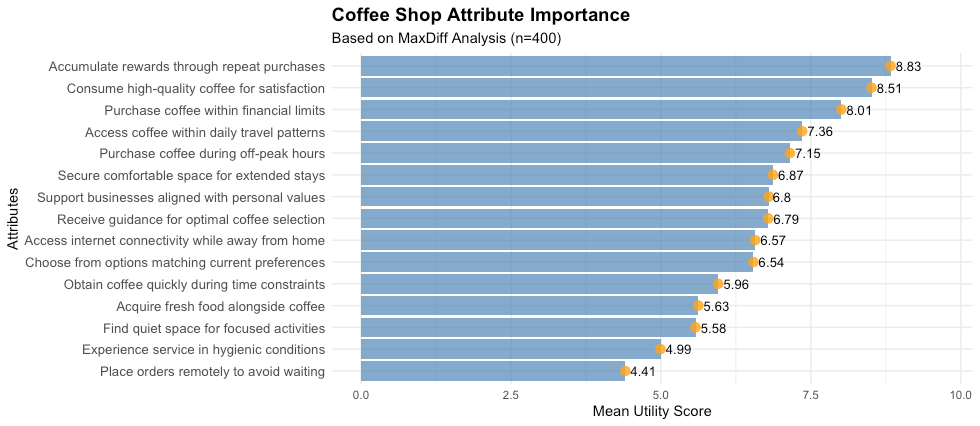
quality_rating* 1.00 6.83 44.78 0.01For the utility scores, pay attention to the mean values. These represent the average importance each attribute holds across all respondents. Notice how "Accumulate rewards through repeat purchases" has the highest mean at 8.83, followed closely by "Consume high-quality coffee for satisfaction" at 8.51 and "Purchase coffee within financial limits" at 8.01. At the other end, "Experience service in hygienic conditions" has the lowest mean at 4.99, while "Place orders remotely to avoid waiting" scores 4.41.
Ranking Your Attributes
The most straightforward way to interpret MaxDiff results is to rank attributes by their mean utility scores. We can extract the utility scores and create a results dataframe:
1# Get basic summary statistics (updated column range)
2summary(maxdiff_chapter8_example[,7:21])
3
4# Calculate mean utilities for each attribute (updated column range)
5mean_utilities <- sapply(maxdiff_chapter8_example[,7:21], mean)
6
7# Create results dataframe
8results <- data.frame(Attribute = names(mean_utilities), Utility = mean_utilities)
9results <- results[order(results$Utility, decreasing = TRUE),]
10
11# Display top results
12print(results[1:10,])> print(results[1:10,])
Attribute Utility gap_to_next
Accumulate rewards through repeat purchases Accumulate rewards through repeat purchases 8.830350 -0.31775759
Consume high-quality coffee for satisfaction Consume high-quality coffee for satisfaction 8.512592 -0.50295923
Purchase coffee within financial limits Purchase coffee within financial limits 8.009633 -0.65320509
Access coffee within daily travel patterns Access coffee within daily travel patterns 7.356428 -0.20420068
Purchase coffee during off-peak hours Purchase coffee during off-peak hours 7.152227 -0.28307766
Secure comfortable space for extended stays Secure comfortable space for extended stays 6.869150 -0.06575980
Support businesses aligned with personal values Support businesses aligned with personal values 6.803390 -0.01251427
Receive guidance for optimal coffee selection Receive guidance for optimal coffee selection 6.790876 -0.21790323
Access internet connectivity while away from home Access internet connectivity while away from home 6.572972 -0.02939756
Choose from options matching current preferences Choose from options matching current preferences 6.543575 -0.58781480
>This ranking reveals what matters most to your customers. The results show coffee shop attributes ranked by their mean utility scores, with clear customer priorities emerging. Rewards programs top the list at 8.83, followed by high-quality coffee at 8.51. The drop to price considerations at 8.01 shows a meaningful gap between top priorities and cost concerns.
The gap_to_next column shows the difference between each attribute and the next-ranked item. This helps identify where the largest preference gaps occur. There's a notable 0.65-point gap between price and location convenience (7.36), indicating distinct tiers of customer priorities rather than gradual decline.
The output shows that loyalty programs and coffee quality drive customer choice, while practical factors like pricing, location, and timing remain key secondary considerations.
Visualizing the Results
Let's look to visualize the prior printed list to better see our results.
1library(gglot2)
2
3ggplot(results, aes(x = reorder(Attribute, Utility), y = Utility)) +
4  geom_col(fill = "steelblue", alpha = 0.7) +
5  geom_point(size = 3, color = "darkred", alpha = 0.8) +
6  geom_text(aes(label = round(Utility, 2)),
7            hjust = -0.2, size = 3.5, color = "black") +
8  coord_flip() +
9  labs(title = "Coffee Shop Attribute Importance",
10       subtitle = "Based on MaxDiff Analysis (n=400)",
11       x = "Attributes",
12       y = "Mean Utility Score") +
13  theme_minimal() +
14  theme(axis.text.y = element_text(size = 10),
15        plot.title = element_text(size = 14, face = "bold")) +
16  expand_limits(y = max(results$Utility) * 1.1)
Understanding the Code
The coord_flip() function rotates the chart to make attribute names readable. The reorder() function automatically sorts attributes by their utility scores, placing the most important at the top.
Visual Elements Working Together
The geom_col() function creates the blue bars that show relative importance. The fill = "steelblue" sets the color while alpha = 0.7 makes them slightly transparent for a professional appearance.
The geom_point() layer adds dark red dots at the end of each bar. These points serve as visual anchors that make it easier to read exact values, especially when bars have similar lengths.
The geom_text() function displays the actual utility scores next to each bar. The round(Utility, 2) ensures numbers show with two decimal places for consistency. The hjust = -0.2 parameter positions text slightly beyond the bar ends, preventing overlap with the bars themselves.
Layout and Spacing Details
The expand_limits(y = max(results$Utility) * 1.1) line creates extra space on the right side of the chart. This prevents the text labels from getting cut off at the chart edges. The multiplication by 1.1 adds 10% additional space beyond the highest value.
Without this expansion, your text labels might disappear or appear cramped against the plot boundary. This small detail makes the difference between a professional-looking chart and one that appears unfinished.
Color and Text Choices
The combination of steelblue bars with dark red points creates good contrast without being overwhelming. The text labels use black color with size = 3.5 to ensure they remain readable across different display sizes.
The theme_minimal() removes unnecessary chart elements like gray backgrounds, creating a clean appearance that focuses attention on your data.
Another way to visualize this information is to use estimates with error bars. This approach was inspired by Chris Chapman's blog post "Individual Scores in Choice Models Part 1: Data & Averages," where he demonstrates how to create more informative visualizations of MaxDiff and choice model results.[36]
Chapman highlights a key point about standard bar charts showing only averages. We can see the averages but have no insight into the distribution. Are the averages strongly different? Or are they close in comparison to the underlying distributions? By adding error bars, we can better assess whether observed differences between attributes are meaningful or simply due to random variation.
1library(ggplot2)
2library(reshape2)
3library(forcats)
4
5# Melt only the utility columns (8:21), without respondent_id
6utility_melted <- melt(maxdiff_chapter8_example[, 8:21])
7
8# Reorder by mean
9utility_melted$variable <- fct_reorder(utility_melted$variable, utility_melted$value, .fun = mean)
10
11# Create the plot
12ggplot(data = utility_melted, aes(x = value, y = variable)) +
13  geom_errorbar(stat = "summary", fun.data = mean_cl_boot, width = 0.4) +
14  geom_point(size = 4, stat = "summary", fun = mean, shape = 20) +
15  theme_minimal() +
16  xlab("Mean Utility Score & 95% CI") +
17  ylab("Attributes") +
18  labs(title = "Coffee Shop Attribute Importance",
19       subtitle = "Mean utility scores with bootstrap confidence intervals (n=400)")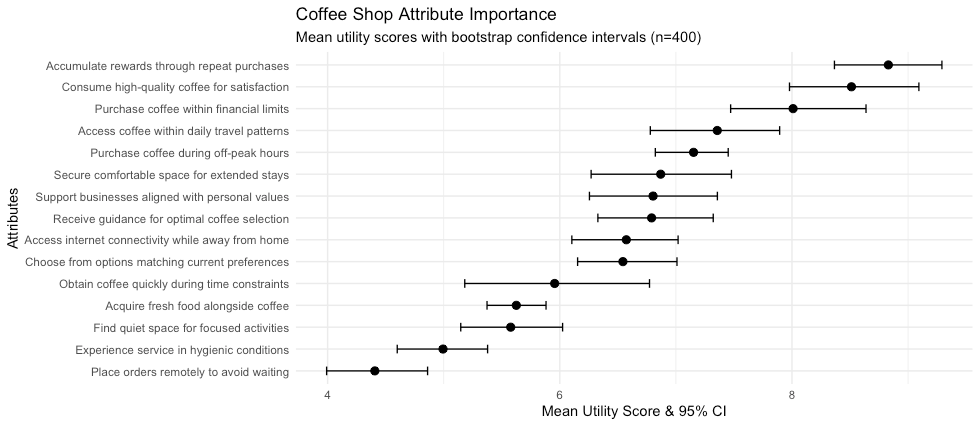
Following Chapman's approach, the chart above uses bootstrap confidence intervals to show the uncertainty around each mean utility score. The error bars help us distinguish between attributes that are truly different in importance versus those that may appear different but have overlapping confidence intervals. This allows us to determine whether the top attribute is really much stronger than other options or only slightly better.
Let's break down the key parts of the code:
The melt() function reshapes the data from wide format to long format. Instead of having separate columns for each attribute, it creates one column for attribute names and another for their utility values. This structure works better with ggplot2's layered approach to building charts.
1utility_melted <- melt(maxdiff_chapter8_example[, 8:22])The fct_reorder() function from the forcats package sorts the attributes by their mean utility scores. This puts the most important attributes at the top of the chart and the least important at the bottom, making patterns easier to spot.
1utility_melted$variable <- fct_reorder(utility_melted$variable, utility_melted$value, .fun = mean)The geom_errorbar() layer adds the confidence intervals. The mean_cl_boot function calculates bootstrap confidence intervals, which provide a robust way to estimate uncertainty around the mean values. The bootstrap method resamples the data many times to estimate the variability of the mean.
1geom_errorbar(stat = "summary", fun.data = mean_cl_boot, width = 0.4)The geom_point() layer adds the actual mean values as solid circles on top of the error bars. The size = 4 parameter makes the points large enough to see clearly, while shape = 20 creates filled circles.
1geom_point(size = 4, stat = "summary", fun = mean, shape = 20)This creates a clearer picture of which coffee shop attributes are genuinely more important to customers versus those that are statistically similar in their utility scores. Looking at our chart, we can see that "Accumulate rewards through repeat purchases" stands out as clearly more important than other attributes, while several attributes in the middle have overlapping confidence intervals.
However, as Chapman also points out, while charts with error bars provide valuable statistical insight, they still focus on averages rather than individual customer preferences. We do not reach any "average" customer. We reach individuals. This limitation leads to his preference for distribution plots that show the full range of individual responses. If you are interested in distribution plots check out his blog post for more details.
8.7 Chapter Conclusion
Figuring out what customers want is essential to building great products and services, and the method you use to get those answers matters. A flawed method can lead to misleading results, while a solid one gives you the clarity to act with confidence.
We've seen how MaxDiff, combined with a thoughtful approach to framing your questions around satisfaction, provides a complete and way to prioritize customer needs. You now have a practical workflow to get a reliable, ranked list of what matters most to your customers.
But what do you do with this list? Now that you have these priorities, how do you use them to come up with new ideas and build a product roadmap? That is exactly where we are headed in the next chapter.
Chapter 8 Summary
-
The traditional opportunity algorithm presented in the previous chapter is methodologically flawed, often leading to unreliable priorities. Maximum Difference Scaling (MaxDiff) is a statistically sound and practical alternative.
-
Instead of using abstract rating scales, MaxDiff works by showing respondents small sets of items and asking them to choose the most and least important (or appealing, satisfying, etc.). This forces realistic trade-offs and reveals a true hierarchy of needs.
-
Framing the MaxDiff question around satisfaction ("Which were you most/least satisfied with?") is an approach to avoid users rating all needs as important. It is often more actionable than asking about abstract importance because it directly highlights performance gaps and unmet needs.
-
Designing a successful MaxDiff study involves several key steps: writing clear, comparable statements; setting the right parameters (sample size, items per set, sets per respondent); carefully planning the survey fielding (screeners, incentives); and ensuring data quality through active monitoring and cleaning.
-
The output of a MaxDiff analysis is a set of utility scores for each item. These scores allow you to create a clear, ranked list of customer priorities, confidently identifying what matters most and where to focus your efforts.
Chapter 8 Exercises
1. Choose Your Own Scenario & Plan Your Study: Think of a product, service, or experience you're familiar with and would like to improve. This could be related to your job, a hobby, or even a daily app you use. The key is to pick a topic where you can realistically brainstorm a list of customer needs or priorities.
For inspiration, you could focus on a topic like:
- Prioritizing new features for a fitness app.
- Improving the online checkout process for a retail website.
- Understanding what remote employees value most in a work-from-home setup.
- Enhancing the visitor experience at a local museum.
Once you've chosen your topic, create a brief research plan that defines:
- Your single most important research objective.
- A final list of statements you will test.
- Your chosen design parameters (sample size, items per set, sets per respondent).
- The introductory text and instructions for your respondents.
2. Select a Platform and Build the Survey: Many survey platforms offer MaxDiff question types. Find one you can access. Many offer free trials or have free plans with limited features.
- Common Platforms: Qualtrics, Sawtooth Software, and Conjointly are industry standards.
- Action: Sign up for a trial or use an existing account to build your survey. Input your statements and set up the MaxDiff exercise according to the design parameters you defined in step 1.
3. Pilot Test Your Survey: Once your survey is built, don't launch it to hundreds of people. Instead, run a pilot test as described in the chapter.
- Action: Find 2-3 friends or colleagues and send them the survey link.
- Ask them for feedback: Was anything confusing? Did any of the choices feel impossible to make? How long did it take them?
- Use their feedback to refine your statements or instructions before a full launch.
References
[34] Sawtooth Software. “Creating a MaxDiff.” SawtoothSoftware.com. Available at: https://sawtoothsoftware.com/help/discover/survey-elements/maxdiff/creating-a-maxdiff.
[35] Qualtrics. “MaxDiff Analysis Technical Overview.” Qualtrics.com. Available at: https://www.qualtrics.com/support/conjoint-project/getting-started-conjoints/getting-started-maxdiff/maxdiff-analysis-white-paper/.
[36] QuantUX Blog. “Individual Scores in Choice Models, Part 1: Data & Averages.” QuantUXBlog.com. Available at: https://quantuxblog.com/individual-scores-in-choice-models-part-1-data-averages.
[37] What Is MaxDiff? Available at: https://sawtoothsoftware.com/help/lighthouse-studio/manual/what-is-maxdiff.html
[38] Guinn, A. (n.d.). Stated vs. Derived Importance: What’s the Difference? Decision Analyst. Available at: https://www.decisionanalyst.com/blog/stated-vs-derived-importance/
[39] Sawtooth Software. (n.d.). Sample Size Calculator. Available at: https://sawtoothsoftware.com/resources/sample-size-calculator