Chapter 4: Identifying the Core Job
Defining your core functional job

With the job executor identified, the next step is defining their core functional job.
What Makes a Well-Defined Functional Job
We focus specifically on functional jobs because they represent the core utility customers seek from any solution. Unlike emotional jobs (how customers want to feel) or social jobs (how customers want to be perceived), functional jobs describe the practical outcomes customers need to accomplish. These functional jobs remain stable over time, making them reliable foundations for product strategy and innovation.
Whether you choose a broad or specific focus, effective job statements share several characteristics. They describe what customers want to accomplish, separate from any particular solution. Your product becomes simply a means to help them achieve this goal.
Effective core functional job statements must be:
- Formulated precisely without ambiguity
- Remain free from solutions or implementation details
- Stay stable over time as technologies and markets evolve
- Focus on functional outcomes rather than emotional or social needs
The syntax follows a structure that ensures clarity and consistency across your research:
Verb + object of the verb + contextual clarifier
For example, Spotify users might have a core job to "listen to music while commuting." This statement captures the functional goal (listening to music), the object (music), and the relevant context (while commuting) without prescribing any particular solution.
Additional examples of clear functional jobs
Calculator app: "Perform mathematical calculations for daily tasks" The job isn't about having a digital tool or using any particular interface. It's about getting accurate mathematical results when needed for work, shopping, or personal finance decisions.
Weather app: "Check current weather conditions before leaving home" Users need reliable weather information to make clothing and activity decisions. The job remains the same whether fulfilled by an app, website, or looking outside.
Password manager: "Securely access online accounts across multiple devices" The functional need is seamless, secure authentication. Whether through passwords, biometrics, or future technologies, the job stays constant.
Ride-sharing app: "Get transportation from current location to desired destination" This captures the core transportation need without specifying cars, bikes, scooters, or any particular vehicle type.
Food delivery app: "Obtain prepared meals at home without cooking" The job focuses on getting ready-to-eat food conveniently, regardless of restaurant type or delivery method.
Banking app: "Transfer money between accounts during business hours" Users need to move funds securely and efficiently. The job doesn't specify mobile apps, websites, or physical locations.
Notice how each example avoids mentioning technologies, features, or implementation approaches. They describe stable functional needs that could be fulfilled through various solutions, both current and future.
These clear functional job statements become the foundation for understanding what customers truly value and where innovation opportunities exist. When you define the job properly, you can evaluate any solution based on how well it helps customers accomplish their core functional objective.
Multiple Core Jobs
What happens when your product does multiple core jobs? Take something like Slack or Facebook. These aren't simple solutions with one clear purpose. They help people accomplish several different jobs, and each one matters to different users.
This creates a real problem for product teams. Which job should you focus on? Which one drives people to use your product in the first place? You can't optimize for everything at once without ending up with a mediocre experience across the board.
To handle multiple jobs, first ask: What are you trying to learn? What is the primary research objective of this research?
The way you frame your core functional job depends entirely on what you're trying to learn and what decisions you need to make afterward. A team redesigning a single feature needs a different level of focus than executives planning a five-year product strategy.
Your research objectives, the people who will use these insights, and the business context you're operating in all shape how broadly or narrowly you should define the job. Getting this framing right upfront determines the scope for the entire JTBD project.
Starting with Your Research Purpose
Before diving into job identification, step back and clarify what you want to achieve. Different research objectives require different approaches to defining and analyzing jobs.
When your goal involves improving existing products, you're looking to make what you already do more effective or satisfying for current users. You'll examine current user experiences, identify friction points, and find opportunities to enhance your existing value proposition. This optimization focus keeps you within the boundaries of your current capabilities.
When you're exploring new opportunities, you're considering what you could do beyond current solution boundaries. This exploration looks for adjacent markets, new user segments, or entirely different approaches to serving customer needs that extend beyond what you currently offer.
Both approaches uncover similar foundational elements like user segments, pain points, and existing solutions. However, how you define your core job and apply your findings differs considerably based on which path you're taking.
The question is how do we define a core functional job or jobs that are either closer to our core product for incremental improvements or define the jobs with a high enough level of abstraction to help uncover adjacent market opportunities.
In the next section, we will look at how teams can answer this by looking at job hierarchies or what I call, determining the right "flight level".
Defining the right level of abstraction
Your research objective directly influences how broadly you should define the core job you're studying. Jobs exist in a natural hierarchy where higher levels become broader and more encompassing while lower levels become more specific and tactical.
Consider someone preparing a healthy meal at home. At a tactical level, their job might be "chop vegetables efficiently" or "follow recipe instructions accurately." Moving to a higher level reveals jobs like "prepare nutritious meals at home" or "maintain a healthy diet." At the highest level, they might be trying to "improve overall health and wellness."
You can navigate this hierarchy using two simple questions that Jim Kalbach explores in The Jobs To Be Done Playbook[26]. Asking why moves you toward higher abstraction and broader scope. Asking how moves you toward more specific, tactical details.
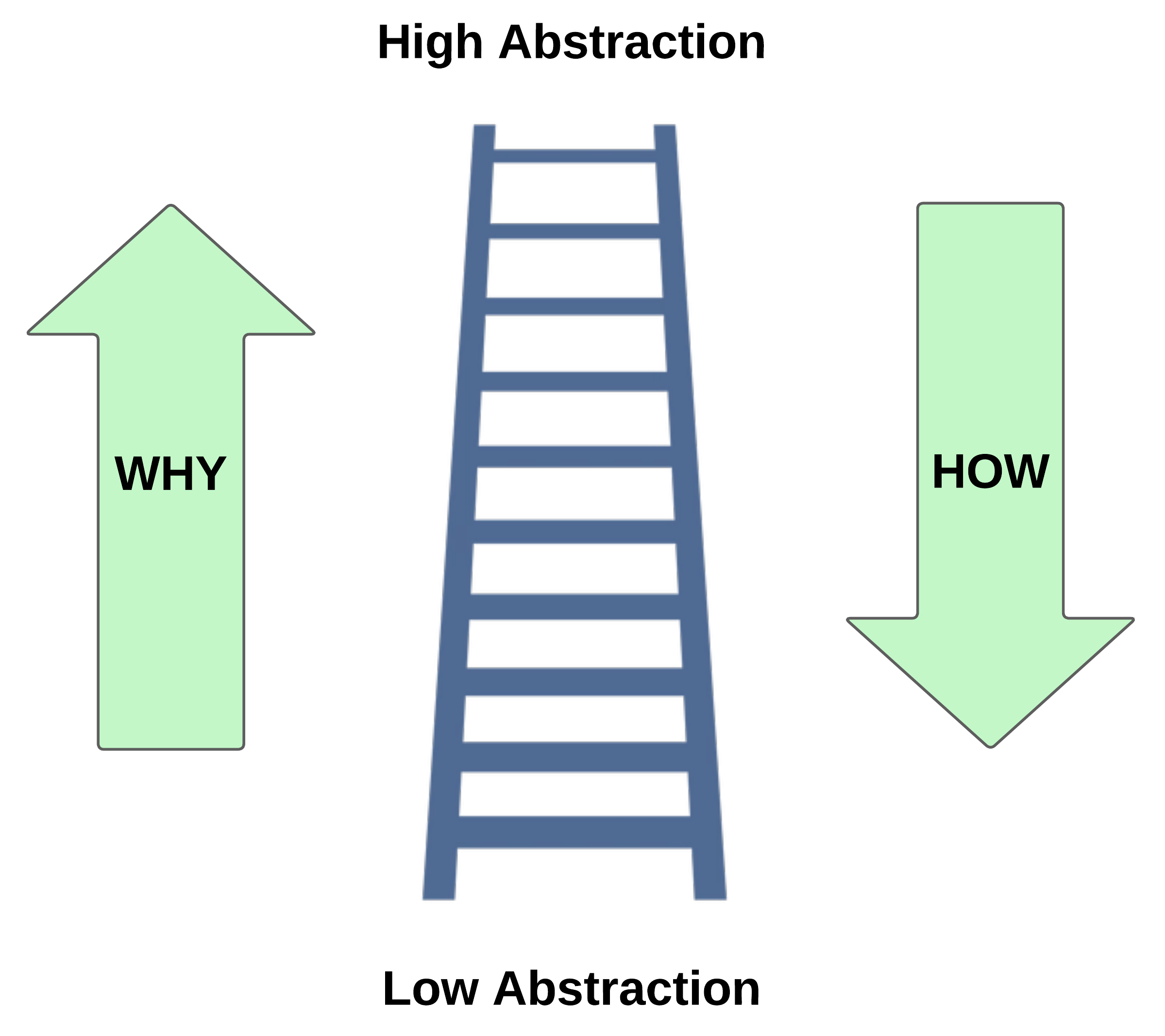
Navigating abstraction with "why" and "how"
Let's see how this works with a practical example. Starting with the core job "prepare nutritious meals at home":
Moving up with "why" (higher abstraction, broader scope):
- Why prepare nutritious meals at home? → To maintain a healthy diet
- Why maintain a healthy diet? → To improve overall health and wellness
- Why improve overall health and wellness? → To live a fulfilling, energetic life
Moving down with "how" (lower abstraction, more specific):
- How do you prepare nutritious meals at home? → Plan balanced recipes and source quality ingredients
- How do you plan balanced recipes? → Research nutritional requirements and select appropriate foods
- How do you select appropriate foods? → Read nutrition labels and compare ingredient quality
Notice how the "why" questions reveal increasingly broader jobs that open up entirely different solution spaces, while the "how" questions drive toward more tactical, implementation-focused jobs. Notably, even as we move down the hierarchy, we remain solution-agnostic. We're describing what needs to be accomplished, not prescribing products or methods.
Consider another example with a professional context. A marketing manager's job hierarchy might look like this:
Higher abstraction (asking "why"):
- Create compelling marketing campaigns → Drive business growth → Ensure company success and sustainability
Lower abstraction (asking "how"):
- Create compelling marketing campaigns → Develop targeted messaging for particular audiences → Research audience preferences and pain points
Choosing Your Research Approach: A Decision Framework
Before defining your core job and selecting an abstraction level, use this framework to ensure you're applying the right methodology to your business question.
Step 1: What is your primary research objective?
Start by identifying what question you're ultimately trying to answer:
Step 2: Who will act on your findings?
Your audience determines the level of abstraction that will be most useful:
Step 3: What's your timeline for action?
Step 4: Decision checkpoint
Based on your answers above, determine your path:
→ If strategic objective + senior audience + longer timeline: Proceed with ODI. Use this chapter to define your core job at the appropriate abstraction level.
→ If tactical objective + product team audience + short timeline: ODI will likely create more complexity than clarity. Consider:
- For feature prioritization: MaxDiff studies, Kano analysis, or conjoint analysis
- For usability improvements: Usability testing, heuristic evaluation, or session recordings
- For conversion optimization: A/B testing, funnel analysis, or behavioral analytics
- For understanding user needs qualitatively: Switch interviews (Bob Moesta), demand-side research (Alan Klement), or continuous discovery interviews
→ If mixed objectives or uncertain: Start with qualitative JTBD interviews to understand the landscape, then decide whether full ODI quantification is warranted. You can always use the job mapping frameworks from this book without committing to the full ODI quantification process.
Aligning abstraction level with research objectives
This hierarchy matters when you consider how your research objectives should influence where you focus. The level you choose determines not only what you study but what solutions become visible.
For incremental improvements, match your product's current scope. If your meal kit service handles ingredient sourcing and recipe curation, focus on jobs like "efficiently prepare home-cooked meals with minimal planning" rather than the broader "improve overall health." This focused approach helps you identify pain points in the cooking process. Perhaps customers struggle with timing multiple dishes or dealing with unfamiliar cooking techniques.
For new markets or opportunities outside your core business, explore higher abstraction levels. The health improvement job reveals possibilities extending far beyond meal preparation: fitness tracking integration, personalized wellness coaching, nutritional deficiency monitoring, or even sleep and stress management solutions. A meal kit company operating at this level might discover opportunities in mental health support, since nutrition strongly impacts mood and cognitive function.
For tactical optimization, dive into lower levels. If you're improving an existing recipe app, focusing on jobs like "accurately measure ingredients" or "coordinate cooking timing" reveals usability improvements. These might include better measurement tools, timer integration, or step-by-step visual guidance.
Author Note: If teams are looking to be tactical in terms of product improvements, I would recommend not using the ODI approach. Potentially look at other applications of JTBD like Alan Klements, Bob Moesta, Ash Maurya, etc. Reason is because the ODI approach will have teams left with 50-60 outcome/need statements that make it incredibly difficult for tactical product teams to know what to deal with. More on this later in the chapter.
Extended examples across industries
Financial services example:
- High level: Achieve financial security and peace of mind
- Mid level: Effectively manage personal finances
- Low level: Track monthly expenses → Categorize individual transactions
A traditional bank focusing on the mid-level job might develop better budgeting tools. But exploring the higher-level job could reveal opportunities in financial education, insurance products, or even career development services that help people earn more.
Fitness industry example:
- High level: Live a healthy, confident lifestyle
- Mid level: Maintain physical fitness
- Low level: Complete effective workouts → "Perform exercises with proper form
A gym focusing on the lower level might invest in better equipment or instructional videos. But the higher level reveals opportunities in nutrition counseling, mental health support, social community building, or even career coaching that builds confidence in other life areas.
Software development example:
- High level: Deliver valuable software that serves users
- Mid level: Build reliable, maintainable applications
- Low level: Write clean, efficient code" → Debug functionality
Development tool companies operating at different levels create vastly different solutions. Lower-level focus yields better debuggers and code editors. Higher-level focus might produce user research tools, product management platforms, or even business strategy software.
Matching Your Approach to Your Audience
The stakeholders who will use your research insights should heavily influence how you define and present jobs. A job definition that helps executives make portfolio decisions might be too abstract for product teams building features. Conversely, tactical job definitions that guide feature development might miss the strategic lens that inform market expansion decisions.
This audience consideration connects directly to the abstraction level choices we discussed earlier. Different organizational roles need different flight levels to make effective decisions and take meaningful action. Your job definition should serve the people who will apply your research findings.
C-suite executives need clarity for market positioning and portfolio decisions, benefiting from high-level abstraction that reveals new market opportunities and competitive positioning insights. Product teams need tactical specificity for feature development and user experience optimization, though they also benefit from understanding broader roadmap expansion possibilities.
Marketing and brand teams use high-level insights for positioning and market expansion messaging while applying low-level abstraction findings that are closer to the product for campaign targeting and feature-specific communications. UX and design teams use broad perspectives for holistic user experience design and journey mapping while using detailed insights for interface improvements and pain point solutions.
Best use of JTBD and ODI Research
In my experience, JTBD and specifically ODI research excel when addressing strategic business questions and engaging senior stakeholders, but struggle with tactical product decisions.
JTBD works best for strategic questions like "What markets should we enter?" or "How do we redefine our competitive landscape?" The methodology's strength according to Ulwick and others lies in revealing unmet needs across broader solution spaces, uncovering adjacent market opportunities from a needs perspective, and providing frameworks that senior leaders can use to communicate a perspective of their strategy. Directors and above value these insights because it connects customer needs to business strategy in ways that inform portfolio decisions and resource allocation.
For example, companies like Amazon have used job-based thinking to expand beyond their original scope. Understanding that customers wanted to "acquire needed products efficiently" rather than just "buy books online" opened pathways to everything from cloud computing services to grocery delivery. The job framework provided a common language for executives to evaluate seemingly unrelated opportunities against a consistent customer value proposition. Look at the quote below from Jeff Bezos, former CEO and founder of Amazon.
This is another really good and deep question because there are big things that are really important to manage, and then there are small things. Internally into Amazon, we call them paper cuts. So we’re always working on the big things, if you ask me. And most of the energy goes into the big things, as it should, and you can identify the big things. And I would encourage anybody, if anybody listening to this is an entrepreneur, has a small business, whatever, think about the things that are not going to change over 10 years. And those are probably the big things. So I know in our retail business at Amazon, 10 years from now, customers are still going to want low prices. - Jeff Bezos, Lex Fridman Podcast
However, this strength or positive becomes a weakness when teams need immediate, actionable guidance for product development. JTBD research typically requires many months to execute properly, involving customer interviews, job mapping, and competitive analysis. Also, the end output of ODI research is a list of unmet need statements in a rigid syntax that is hard for product teams to follow (more on this in chapter 5). Product teams working in agile environments need insights they can act on within days, not quarters.
For tactical product decisions like feature prioritization, interface design, or conversion optimization, JTBD often creates more complexity in my experience. Teams asking "What should we build next sprint?" or "Which features drive retention?" typically get faster, more actionable insights from methods like Conjoints, MaxDiff, user interviews, focus groups, usability testing, or behavioral analytics. JTBD's broad lens can actually mislead teams into over-analyzing decisions that benefit from rapid experimentation.
Consider a product team trying to improve their mobile app's checkout process. JTBD research might reveal that customers want to "complete purchases quickly during busy moments." While accurate, this insight doesn't tell the team whether to reduce form fields, add payment options, or improve error messaging. A/B testing different checkout flows provides clearer direction for immediate improvements.
The ODI framework also struggles with questions about user interface design and interaction patterns. Asking customers about their jobs rarely yields insights about button placement, navigation hierarchy, or visual design preferences. These tactical elements require direct observation of user behavior and rapid testing cycles that JTBD's comprehensive approach can't match.
Furthermore, ODI research can overwhelm product teams with too many possibilities. When research reveals multiple unmet needs across different job stages, teams often struggle to prioritize what to build first. The methodology's strength in revealing opportunities becomes a paralysis of choice for teams that need clear direction for their next development sprint.
So my recommendation is to use ODI to establish strategic direction and market understanding, then transition to different research methods for execution. This approach gives senior stakeholders the strategic narrative they need while providing product teams the tactical insights that drive day-to-day decisions.
The most effective organizations I've worked with create a research pipeline that flows from strategic to tactical. They begin with JTBD using the ODI approach to establish market positioning and identify opportunity areas. Once they've committed to pursuing specific opportunities, they shift to other research methods that inform feature development and user experience optimization. This staged approach ensures that tactical decisions support strategic direction while maintaining the speed that product development requires.
The key is matching the research method to both the business question and the stakeholder who needs to act on the results. JTBD and ODI provides the strategic foundation that guides where to focus effort, while other methodologies provide the tactical insights that determine how to focus that effort most effectively.
Narrowing Down to Your Core Job
Once you recognize that your product likely serves multiple jobs, you need a way to identify which ones matter most. These three steps may help you determine what the core job of your platform is.
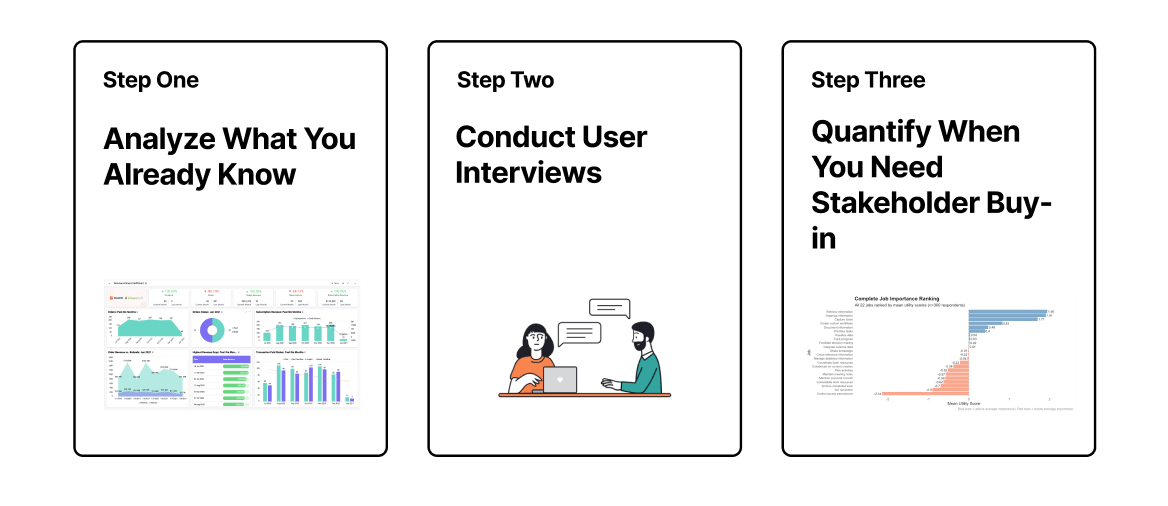
Step 1: Analyze What You Already Know
Begin by examining data you already have access to within your organization. Usage analytics reveal which features and workflows drive the most engagement, while support tickets and churn analysis illuminate where current solutions fail to serve user needs effectively. Customer feedback, reviews, and sales conversations often explicitly mention the primary goals users are trying to accomplish.
Look beyond surface level metrics to understand the why behind user behavior. High engagement with a particular feature might indicate it serves a core job, but it could also signal friction elsewhere in the experience. Similarly, features with low usage aren't necessarily unimportant they might serve highly important but infrequent jobs, or they might be poorly designed solutions to important problems.
Support data offers particularly rich insights into job priorities. Tickets that appear repeatedly across different user segments often point to gaps in serving a core job. Pay attention to the language customers use when describing their problems they'll often articulate the job they're trying to accomplish and why your current solution isn't helping them get it done.
Sales conversations and customer success interactions provide another valuable lens. Listen for phrases like "we bought this to help us" or "our main goal is" These conversations capture jobs at the moment of purchase decision and throughout the customer lifecycle, revealing both primary motivations and evolving needs.
Pay particular attention to segmentation patterns in this data. Different user segments often hire your product for different primary jobs, and understanding these patterns helps you make informed decisions about where to focus your research and development efforts. A feature that's critical for enterprise customers might be irrelevant for small businesses, suggesting different core jobs across segments.
Step 2: Conduct User Interviews
While you'll learn detailed interview techniques in Chapter 5, the key at this stage is conducting interviews focused on job prioritization rather than general discovery. Interview participants from your primary market segments and job executor roles to uncover what main goals they're trying to accomplish using your product.
Structure these conversations around understanding not just what jobs they're trying to get done, but which jobs are most important, most frequent, and most poorly served by current solutions. Ask participants to walk you through their typical usage patterns and describe what success looks like for their primary use cases.
Focus on comparative questions that force prioritization decisions. Rather than asking "What do you use our product for?" try "When you absolutely need to get something done quickly, what's the first thing you turn to our product for?" or "If you could only use three features, which would they be and why?" These questions reveal true priorities rather than comprehensive feature lists.
Pay close attention to the emotional language participants use when describing different jobs. Frustration, urgency, and relief are strong indicators of job importance. When someone says "I was so stressed until I figured out how to do this" or "This completely changed how we work," they're highlighting a core job your product serves.
Don't just focus on current usage patterns. Ask about workarounds, alternative solutions, and what they did before your product existed. Understanding the full context of how they approach these jobs helps you see where your product fits in their larger workflow and which aspects truly matter most to them.
Authors Note: I believe most of the time by analyzing previous data sources, speaking with customers, and even talking through with internal stakeholders, teams can have an 80%-90% confidence or strong enough point in knowing what the core functional job(s) of their product/service they should focus on without having to run any quantification research. In my opinion, the reason to run quantification research to understand the underlying needs to prioritize or hidden patterns in how users might cluster jobs is to make stakeholders happy with big samples.
Interview and Analysis: Uncovering Multiple Core Jobs
Products, especially complex platforms like Asana, are often hired to do several different core jobs for the same user. A skilled interviewer can uncover these distinct jobs by probing different phases of the user's workflow.
Let's continue our conversation with Sarah, the marketing project manager, to see what else we can learn.
Extended Interview with Sarah
Interviewer: Thanks for speaking with me, Sarah. Can you start by walking me through the last time you used Asana?
Sarah: Sure. This morning, actually. I had our weekly check-in with the VP of Marketing. Before the meeting, I opened up the main project Portfolio in Asana to get a quick snapshot of where everything stood. I needed to see which tasks were overdue and what the team had completed since last week.
Interviewer: What was the most important thing you needed to accomplish with Asana at that moment?
Sarah: Definitely getting a clear status update for the VP. Before we had Asana, that was a nightmare. I’d spend an hour before each meeting pinging people on Slack, digging through email threads... it was chaos. Now, I can just look at the dashboard and have a confident answer when she asks, "Are we on track for the launch?" That single view saves me from so much stress. The feeling of relief is huge.
Interviewer: Thanks for that insight on reporting. It's clear that visibility for leadership is critical. I'd like to shift focus a bit. Can you walk me through the beginning of a project, before any tasks are even assigned?
Sarah: Oh, the beginning is the messiest part. I get a project brief from a director, and it's usually just a goal, like "Launch the new winter campaign." My job is to turn that one sentence into a full-blown project plan. Before Asana, I’d do this in a spreadsheet. It was terrible because I'd always miss dependencies. The copywriter couldn't start until the messaging was approved, but the designer needed copy for the mockups... it was a chicken-and-egg problem. It felt like I was building a puzzle in the dark.
Interviewer: How has Asana changed that for you?
Sarah: The Timeline view is a lifesaver. I can visually map out the phases and drag-and-drop dependencies. If I see that a design task depends on a copy task, I can link them. When I finish, I have a realistic schedule that I can actually commit to. It’s the difference between guessing and knowing we have a viable plan.
Interviewer: That makes sense. Now let's talk about the middle of a project, when things are in full swing. What’s a major challenge you face there?
Sarah: Definitely managing team workload. I have three designers, and one of them, Alex, is a superstar, so everyone wants him on their project. In the past, I had no real way of knowing how much was on his plate. I'd assign him a new task, and he'd say yes, but then he'd be working until 10 PM. I felt awful. Preventing my team from burning out is one of the things that keeps me up at night.
Interviewer: And how do you approach that challenge now?
Sarah: The Workload feature in Asana has been a game-changer. I can see at a glance that Alex is at 150% capacity while another designer is at 60%. It allows me to reassign tasks and have a real conversation about priorities. It’s not about micromanaging; it’s about protecting my team’s well-being so we can maintain a sustainable pace.
Interviewer: One last question. What about your own work? How do you start your day?
Sarah: It's funny, we've talked all about the team, but my personal "My Tasks" page is my command center. I come in, and I have 30 tasks assigned to me from five different projects. It's overwhelming. My first action every morning is to sort that list by due date and manually add my top three priorities for the day. That simple act of sorting and choosing helps me cut through the noise and focus on what I need to accomplish.
Breaking Down the Interview to Find Multiple Core Jobs
This extended conversation reveals that Sarah hires Asana for at least four distinct functional jobs, each addressing a different pain point in her workflow.
Job 1: Aligning Stakeholders
- Evidence: The first part of the interview, where Sarah expressed "relief" at being able to answer her VP's questions confidently. Her pain was the "chaos" of manually chasing down status updates.
- Synthesis:
- Verb: Align
- Object: stakeholders
- Clarifier: on project progress
- Core Job: Align stakeholders on project progress.
Job 2: Planning Projects
- Evidence: Sarah described the beginning of a project as "messy" and like "building a puzzle in the dark." The key outcome she needs is a "realistic schedule" and a "viable plan."
- Synthesis:
- Verb: Translate
- Object: project goals
- Clarifier: into an actionable plan
- Core Job: Translate project goals into an actionable plan.
Job 3: Managing Team Capacity
- Evidence: Sarah's fear of "burning out" her team and the stress of not knowing individual workloads. The desired outcome is a "sustainable pace" and protecting her team's "well-being."
- Synthesis:
- Verb: Balance
- Object: team workload
- Clarifier: to ensure project sustainability
- Core Job: Balance team workload to ensure project sustainability.
Job 4: Prioritizing Personal Tasks
- Evidence: Sarah described her own task list as "overwhelming." Her daily ritual is to "cut through the noise and focus." This is a more personal, execution-focused job.
- Synthesis:
- Verb: Prioritize
- Object: daily tasks
- Clarifier: to maintain personal focus
- Core Job: Prioritize daily tasks to maintain personal focus.
This exercise shows how a single user can have multiple, equally valid core jobs. For a product team at Asana, recognizing these distinct jobs is crucial. They could decide to focus on improving the stakeholder reporting experience, the initial project planning tools, team management features, or the personal productivity workflow. Each path would lead to a different product strategy and roadmap.
Step 3: Validate Job Priorities with Your User Base
Once you have identified a list of functional jobs through interviews, you are often left with a long and unmanageable list of needs. To understand the broader strategy, you need to condense this list into manageable dimensions.
Quantifying Job Relationships with Exploratory Factor Analysis (EFA)
.png&w=3840&q=100)
When you decide to quantify job importance, we turn to Exploratory Factor Analysis, or EFA. Joseph Hair and colleagues, authors of the standard text on multivariate analysis, define EFA as an "interdependence technique." [29]
Unlike regression analysis, which tries to predict an outcome using inputs, EFA looks at all variables simultaneously to define the underlying structure among them.
The Goal: Managing the Variate
As we add more variables (job statements) to our research, the likelihood of overlap or correlation between them increases. EFA allows us to manage this complexity by achieving two goals:
- Data Reduction: We take a large number of variables, such as 22 Notion features, and reduce them to a smaller number of summary "Factors" with minimal loss of information.
- Structure Detection: We identify which variables are highly intercorrelated. These groups of variables are assumed to represent a single underlying dimension or "Core Job" that cannot be adequately described by a single measure.
The Instrument: The Likert Scale
To prepare our data for analysis, we must capture it quantitatively. The standard practice in JTBD research is to use metric data. While nonmetric data (Yes/No) is possible to analyze, it is often problematic for this technique. Therefore, we use a standard Likert Scale (typically 1–5 or 1–7) to measure importance.
For each job identified in the qualitative phase, we ask the user:
"When trying to [Core Job], how important is it to you that you be able to [Specific Functional Job]?" (1 = Not at all important, 5 = Extremely important)
This creates the correlation matrix used for analysis.
How it Works: Finding Latent Dimensions
In your survey, you might ask users about "sharing documents," "commenting," and "assigning permissions." EFA analyzes the correlation matrix of these responses. If users who rate "sharing" highly also consistently rate "permissions" highly, EFA groups them together.
Since we have no preconceived hypothesis on how these jobs relate, we use an Exploratory perspective. We take what the data gives us. If we already had a theory we wanted to test, we would use a Confirmatory perspective. For this chapter, we are taking an exploratory approach to discover how Notion users naturally group these capabilities in their own minds.
The Objective: Summarization vs. Reduction
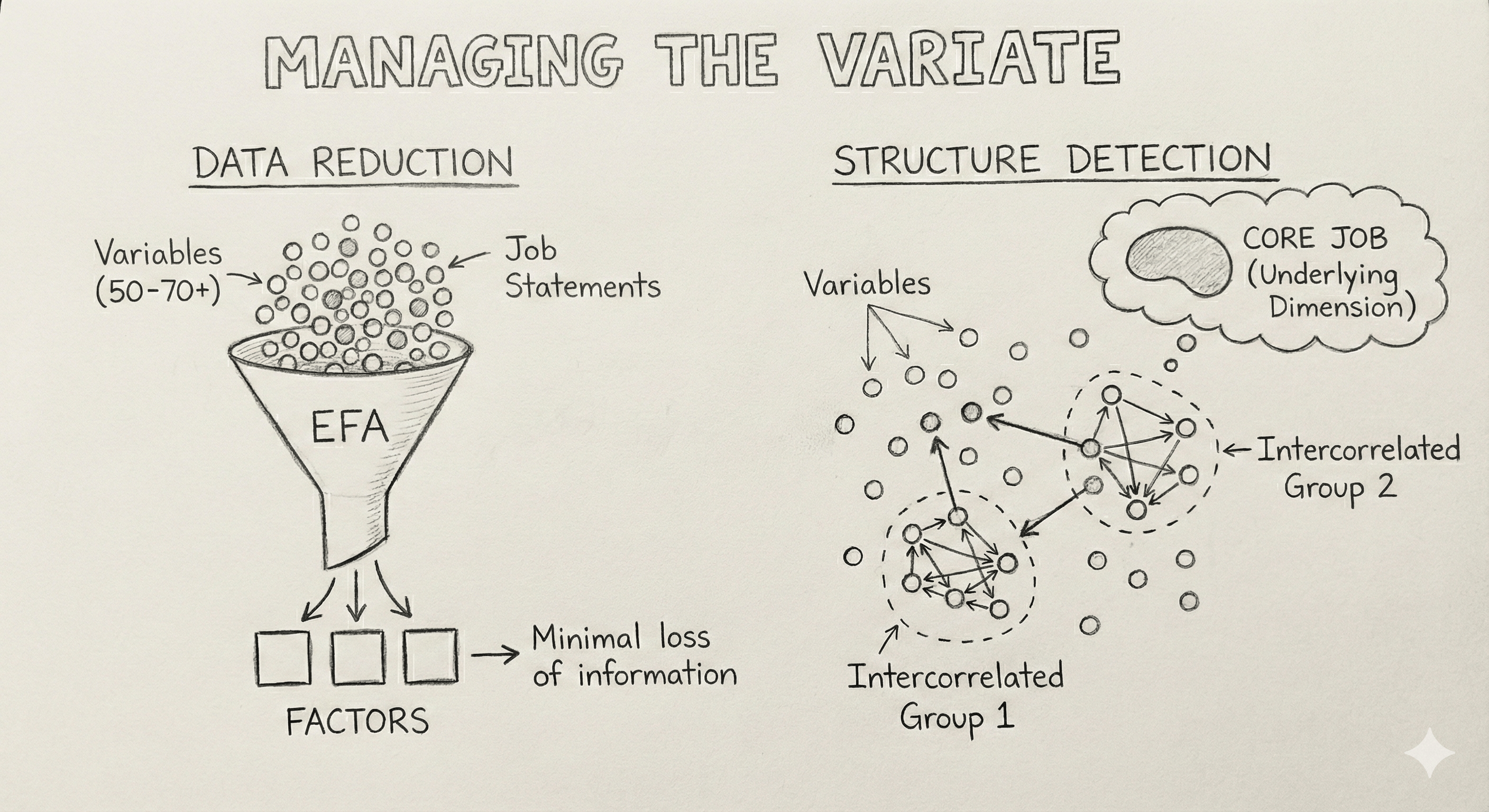
According to Hair, we are attempting to achieve two distinct outcomes with this process:
- Data Summarization: We view the variables collectively. Instead of tracking 22 separate behaviors, we look for the underlying structure that binds them together. This helps us describe the market in broad strokes. For example, we might find that five different features actually represent one desire: Efficiency.
- Data Reduction: We calculate a new, empirical value for each dimension, known as a Factor Score. This allows us to substitute the original 22 variables with just 4 Factor Scores in future analyses to simplify our decision making.
Analyzing Factor Analysis Results: The Notion Example
Note: For readers interested in the statistical methodology, the following section provides a step-by-step guide using R. If you prefer to focus on the outcomes, you can skip ahead to the "Factor Analysis Conclusion" section.
Now let's examine real factor analysis results from 300 Notion users rating 22 different functional capabilities on a 5-point Likert scale.
Factor analysis using simulated data
Download Raw Survey Data (300 responses)
1# Load required libraries
2library(psych)        # Main factor analysis package
3library(corrplot)     # Correlation visualization
4library(ggplot2)      # Advanced plotting
5library(dplyr)        # Data manipulation
6
7# Load your survey data
8survey_data <- read.csv("jobs_survey_data.csv")
9str(survey_data)
10describe(survey_data)=== FACTOR LOADINGS ===
>str(survey_data)
'data.frame': 300 obs. of 22 variables:
$ Organize_information : int 5 4 4 3 4 4 3 4 5 3 ...
$ Document_information : int 5 5 5 3 4 4 2 5 4 4 ...
$ Capture_ideas : int 4 4 3 3 4 4 2 4 4 4 ...
$ Retrieve_information : int 5 4 4 4 4 5 4 4 5 3 ...
$ Share_knowledge : int 5 3 3 4 4 4 2 3 4 4 ...
$ Maintain_personal_records : int 5 4 4 3 4 5 3 4 4 4 ...
$ Archive_completed_work : int 5 4 4 3 3 4 4 4 5 4 ...
$ Plan_activities : int 5 4 5 4 3 4 4 4 3 5 ...
$ Track_progress : int 5 5 5 5 4 5 4 5 4 5 ...
$ Collaborate_content_creation: int 5 3 4 4 4 4 3 3 4 3 ...
$ Manage_database_information : int 4 3 3 4 4 3 3 4 3 3 ...
$ Create_custom_workflows : int 5 3 4 3 4 3 3 3 3 2 ...
$ Coordinate_team_resources : int 5 4 3 5 4 4 3 3 4 5 ...
$ Prioritize_tasks : int 5 2 5 4 4 4 4 4 5 5 ...
$ Facilitate_decision_making : int 5 4 5 3 4 5 3 5 4 5 ...
$ Consolidate_work_resources : int 4 4 5 4 2 4 3 4 4 5 ...
$ Visualize_data : int 5 4 3 4 3 3 3 3 3 4 ...
$ Maintain_meeting_notes : int 4 2 4 5 5 4 3 3 4 4 ...
$ Integrate_external_data : int 5 5 3 4 3 3 1 4 2 3 ...
$ Cross_reference_information : int 4 4 4 3 4 5 3 5 4 4 ...
$ Set_reminders : int 5 3 5 4 3 3 3 3 4 4 ...
$ Control_access_permissions : int 3 2 3 5 5 4 3 1 5 5 ...
> describe(survey_data)
vars n mean sd median trimmed mad min max range skew kurtosis se
Organize_information 1 300 3.94 0.85 4 3.98 1.48 2 5 3 -0.26 -0.84 0.05
Document_information 2 300 3.87 0.84 4 3.90 1.48 2 5 3 -0.26 -0.62 0.05
Capture_ideas 3 300 3.60 0.83 4 3.59 1.48 2 5 3 0.11 -0.64 0.05
Retrieve_information 4 300 3.86 0.88 4 3.90 1.48 1 5 4 -0.40 -0.28 0.05
Share_knowledge 5 300 3.43 1.01 3 3.43 1.48 1 5 4 -0.04 -0.82 0.06
Maintain_personal_records 6 300 3.70 0.86 4 3.73 1.48 2 5 3 -0.15 -0.66 0.05
Archive_completed_work 7 300 3.77 0.84 4 3.80 1.48 2 5 3 -0.27 -0.52 0.05
Plan_activities 8 300 4.03 0.80 4 4.08 1.48 2 5 3 -0.37 -0.65 0.05
Track_progress 9 300 3.96 0.84 4 4.01 1.48 2 5 3 -0.40 -0.54 0.05
Collaborate_content_creation 10 300 3.47 0.92 3 3.47 1.48 1 5 4 0.00 -0.72 0.05
Manage_database_information 11 300 3.13 0.92 3 3.10 1.48 1 5 4 0.10 -0.31 0.05
Create_custom_workflows 12 300 3.09 0.92 3 3.08 1.48 1 5 4 0.03 -0.47 0.05
Coordinate_team_resources 13 300 3.32 0.98 3 3.29 1.48 1 5 4 0.12 -0.61 0.06
Prioritize_tasks 14 300 3.99 0.83 4 4.01 1.48 1 5 4 -0.29 -0.68 0.05
Facilitate_decision_making 15 300 3.71 0.88 4 3.73 1.48 1 5 4 -0.17 -0.57 0.05
Consolidate_work_resources 16 300 3.78 0.86 4 3.80 1.48 2 5 3 -0.14 -0.77 0.05
Visualize_data 17 300 2.99 1.08 3 2.98 1.48 1 5 4 0.05 -0.62 0.06
Maintain_meeting_notes 18 300 3.41 1.01 3 3.40 1.48 1 5 4 0.02 -0.82 0.06
Integrate_external_data 19 300 2.95 1.03 3 2.90 1.48 1 5 4 0.25 -0.52 0.06
Cross_reference_information 20 300 3.76 0.86 4 3.78 1.48 2 5 3 -0.13 -0.75 0.05
Set_reminders 21 300 3.91 0.83 4 3.94 1.48 2 5 3 -0.27 -0.67 0.05
Control_access_permissions 22 300 3.23 1.05 3 3.20 1.48 1 5 4 0.07 -0.73 0.06
>The describe() function from the psych package provides descriptive statistics for each job rating, including mean, standard deviation, median, skewness, and kurtosis. The str() function shows the data structure, confirming that your Likert scale responses are properly formatted as numeric variables rather than factors or characters.
This output confirms we have 300 complete responses across 22 functional jobs, with all variables properly coded as integers reflecting our 1-5 Likert scale. Notice there are no factor variables or missing data indicators, which is exactly what we want for factor analysis. If you ever see variables coded as factors or characters in your own data, you'll need to convert them to numeric before proceeding with any quantitative analysis.
The descriptive statistics reveal insights about how users perceive Notion's job portfolio. A clear job importance hierarchy emerges from the mean ratings, with core productivity jobs like planning activities (4.03), tracking progress (3.96), and prioritizing tasks (3.99) rating highest among users. At the other end of the spectrum, specialized technical jobs such as data visualization (2.99) and external data integration (2.95) receive notably lower ratings, suggesting natural user segments based on job complexity and technical sophistication. The scale usage patterns validate that our survey captured meaningful user preferences. All variables show full 1-5 range usage with reasonable standard deviations between 0.8 and 1.1, indicating users are thoughtfully differentiating between jobs rather than giving uniform ratings across all items. This variability is essential for factor analysis to identify meaningful patterns.
From a statistical perspective, our data appears ready for factor analysis. The skewness values ranging from -0.4 to +0.25 fall within acceptable ranges, and the similarity between trimmed means and regular means indicates no extreme outliers that could distort our factor extraction. The sufficient variability across all items provides the foundation needed for identifying underlying factor structures.
Testing Factor Analysis Readiness for Your JTBD Data Let's see how we can test that our Notion data is ready for factor analysis. Factor analysis makes several key assumptions about your data structure and quality. If these assumptions aren't met, your factor solution may be unstable, uninterpretable, or simply meaningless for product decisions.
Key assumptions that must hold for reliable factor analysis:
- Sample size adequacy requires enough respondents relative to the number of variables being analyzed. The general rule is at least 5 respondents per variable, with 10:1 being preferred for stable solutions.
- Sampling adequacy means your variables share enough common variance to form coherent factors. If variables are too independent of each other, there's no underlying structure to discover.
- Sufficient correlations between variables must exist for factor analysis to identify patterns. If all variables are uncorrelated, there are no factors to extract.
- Linearity assumes that relationships between variables follow linear patterns rather than complex curves or thresholds.
Let's test these assumptions with our Notion JTBD data:
1# Calculate correlation matrix for all subsequent tests
2cor_matrix <- cor(survey_data, use = "complete.obs")
3
4# 1. Sample size adequacy check
5sample_ratio <- nrow(survey_data) / ncol(survey_data)
6print(paste("Sample size ratio:", round(sample_ratio, 1), ":1"))
7
8# 2. Kaiser-Meyer-Olkin (KMO) test for sampling adequacy
9kmo_result <- KMO(cor_matrix)
10print(paste("Overall KMO value:", round(kmo_result$MSA, 3)))
11
12# Check individual variable KMO values for problematic items
13low_kmo <- which(kmo_result$MSAi < 0.6)
14if(length(low_kmo) > 0) {
15  print(paste("Variables with low individual KMO (<0.6):", names(low_kmo)))
16} else {
17  print("All individual variables have adequate KMO values")
18}
19
20# 3. Bartlett's test of sphericity
21bartlett_result <- cortest.bartlett(cor_matrix, n = nrow(survey_data))
22print(paste("Bartlett's test p-value:", format(bartlett_result$p.value, scientific = TRUE)))
23
24# 4. Examine correlation matrix characteristics
25cor_values <- cor_matrix[upper.tri(cor_matrix)]
26print(paste("Mean correlation:", round(mean(cor_values), 3)))
27print(paste("Correlation range:", round(min(cor_values), 3), "to", round(max(cor_values), 3)))
28
29strong_corr <- sum(abs(cor_values) > 0.3)
30total_corr <- length(cor_values)
31print(paste("Strong correlations (|r| > 0.3):", strong_corr, "of", total_corr,
32           paste0("(", round(100*strong_corr/total_corr), "%)")))
33
34cor_matrix <- cor(survey_data, use = "complete.obs")[1] "Sample size ratio: 13.6 :1" [1] "Overall KMO value: 0.933" [1] "All individual variables have adequate KMO values" [1] "Bartlett's test p-value: 0e+00" [1] "Mean correlation: 0.351" [1] "Correlation range: 0.03 to 0.641" [1] "Strong correlations (|r| > 0.3): 165 of 231 (71%)"
The sample size ratio of 13.6:1 means we have nearly 14 respondents for every job we're analyzing, well above the minimum threshold that statisticians recommend for stable factor solutions. This excellent ratio gives us confidence that our factor structure will be robust and generalizable beyond this sample.
The Kaiser-Meyer-Olkin value of 0.933 indicates strong sampling adequacy, meaning our 22 JTBD variables share enough common variance to form meaningful factors. This high KMO value is particularly encouraging for product teams because it suggests that users have coherent mental models about how different platform capabilities relate to each other, rather than thinking about each job in complete isolation.
Bartlett's test of sphericity confirms that our correlation matrix contains sufficient relationships between variables to warrant factor extraction. The small p-value rejects the hypothesis that our variables are uncorrelated, meaning there are meaningful patterns in how users prioritize different capabilities that factor analysis can uncover.
Let's take a closer look at the correlation matrix. We can visualize the correlation matrix in different ways to help identify patterns to help us think about the potential factor structures that might affair during the factor analysis.
1# Load required libraries for visualization
2library(corrplot)
3library(ggplot2)
4library(reshape2)
5library(RColorBrewer)
6library(igraph)
7
8# 1. Clustered correlation heatmap
9corrplot(cor_matrix,
10         method = "color",
11         type = "full",  # Changed from "upper"
12         order = "hclust",
13         addCoef.col = "black",
14         tl.cex = 0.6,
15         tl.col = "black",
16         tl.srt = 45,
17         number.cex = 0.5,
18         addrect = 4,
19         rect.col = "red",
20         rect.lwd = 2,
21         title = "Notion JTBD Correlations with Values and Clusters")
22
23# 2. Hierarchical clustering dendrogram
24job_dist <- dist(cor_matrix, method = "euclidean")
25job_cluster <- hclust(job_dist, method = "ward.D2")
26
27plot(job_cluster,
28     main = "Job Clustering Based on Correlations",
29     xlab = "Jobs",
30     ylab = "Distance",
31     cex = 0.7)
32rect.hclust(job_cluster, k = 4, border = "red")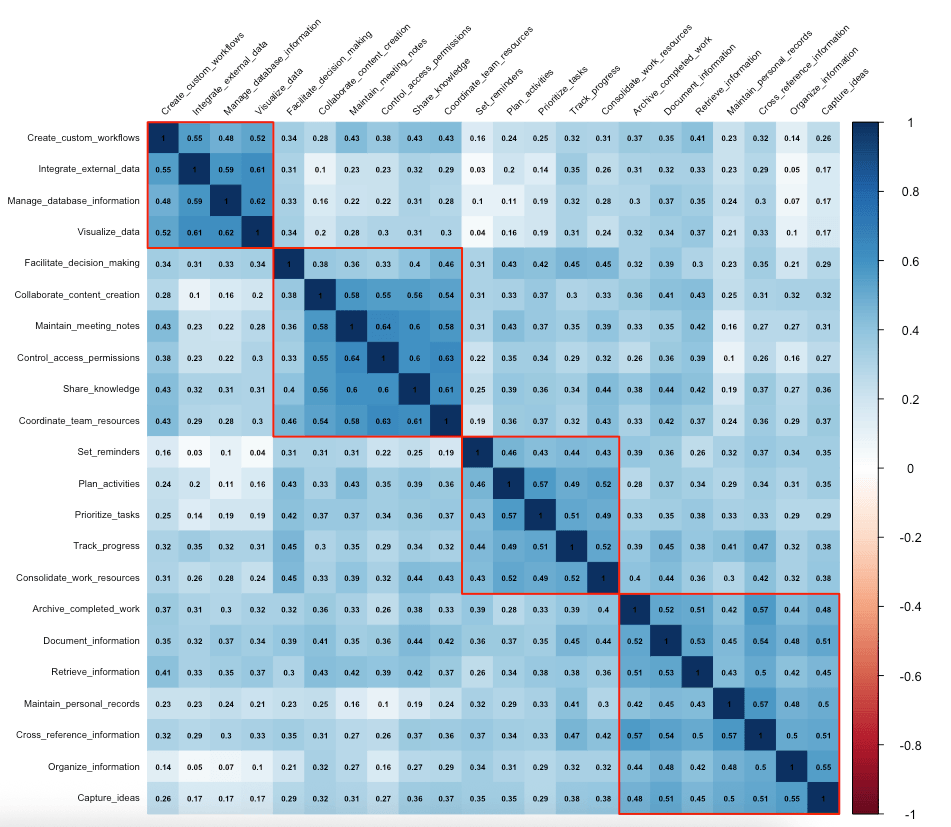
The clustered correlation heatmap reveals four distinct blocks of highly correlated jobs, confirming our statistical assumptions about underlying structure. The information management jobs cluster together at the bottom right, showing strong intercorrelations around organizing, documenting, and cross-referencing information. The productivity workflow cluster emerges clearly around planning, tracking, and prioritizing tasks, while collaboration jobs form their own coherent block centered on sharing knowledge and coordinating team resources. Most isolated are the technical jobs, which show strong internal correlations but weaker connections to other job families.
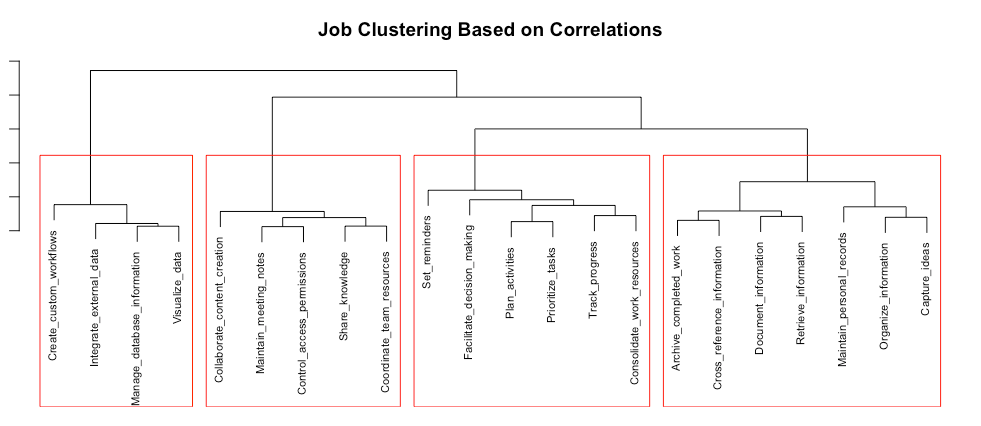
The hierarchical clustering dendrogram provides the clearest preview of our likely factor structure. The four natural clusters shown by the red rectangles mirror our correlation analysis, with the technical jobs, collaboration jobs, productivity workflow jobs, and information management jobs each forming distinct branches. The height at which clusters merge indicates their relative similarity, with technical jobs merging at a much higher level, confirming their distinctiveness from other job families.
These visualizations validate both our statistical assumptions and our conceptual understanding of Notion's job architecture. The clear separation between job clusters, combined with moderate correlation strengths within clusters, suggests we'll extract interpretable factors corresponding to these natural groupings. The visual evidence gives us confidence that our factor analysis will reveal meaningful insights about how users mentally organize Notion's capabilities, providing a solid foundation for the factor extraction process that follows.
Let's start the factor analysis
First, we need to determine the optimal number of factors
1# Kaiser criterion (eigenvalue > 1)
2eigenvalues <- eigen(cor_matrix)$values
3sum(eigenvalues > 1)
4
5# Scree plot
6scree_data <- data.frame(Factor = 1:length(eigenvalues),
7                        Eigenvalue = eigenvalues)
8
9ggplot(scree_data, aes(x = Factor, y = Eigenvalue)) +
10  geom_line(size = 1) +
11  geom_point(size = 3) +
12  geom_hline(yintercept = 1, linetype = "dashed", color = "red") +
13  labs(title = "Scree Plot",
14       subtitle = "Look for the 'elbow' where slope flattens",
15       x = "Factor Number", y = "Eigenvalue") +
16  theme_minimal()
17
18# Parallel analysis
19pa_result <- fa.parallel(survey_data, fa = "fa", n.iter = 100,
20                        show.legend = FALSE, main = "Parallel Analysis")
21pa_result$nfact
22
23# Variance explained
24variance_explained <- cumsum(eigenvalues) / sum(eigenvalues)
25variance_explained[1:6]
The above code highlights three different methods to determine the optimal number of factors, and all point to the same conclusion.
> eigenvalues <- eigen(cor_matrix)$values
> sum(eigenvalues > 1)
[1] 4
The Kaiser criterion examines eigenvalues, which represent how much variance each factor explains in your dataset. Any factor with an eigenvalue greater than 1 is considered meaningful because it explains more variance than a single survey question would on its own. The data reveals 4 factors that meet this threshold, suggesting there are 4 distinct underlying dimensions in your survey responses.
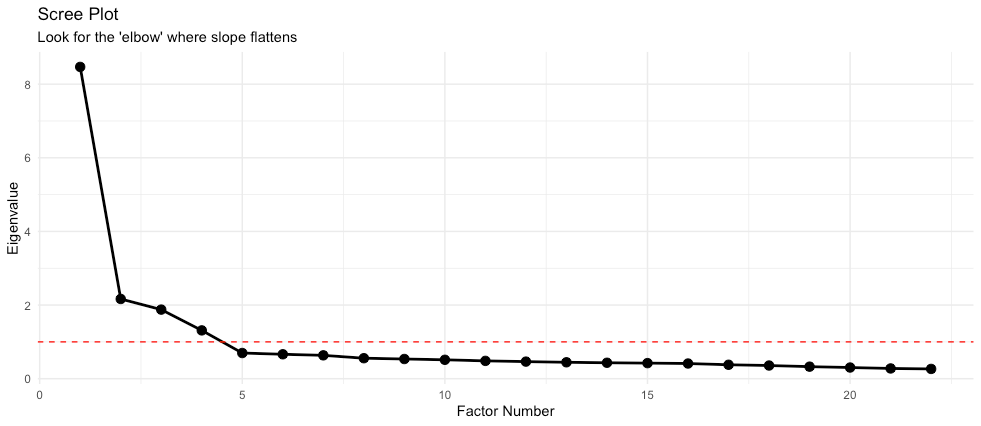
The scree plot provides a visual representation of these eigenvalues, plotting them against factor numbers to help identify the "elbow" point where the line flattens out. This elbow indicates where additional factors stop adding meaningful explanatory value to your analysis. The red dashed line at eigenvalue = 1 serves as a visual reference for the Kaiser criterion cutoff, making it easy to see which factors meet the threshold.
> pa_result <- fa.parallel(survey_data, fa = "fa", n.iter = 100,
+                         show.legend = FALSE, main = "Parallel Analysis")
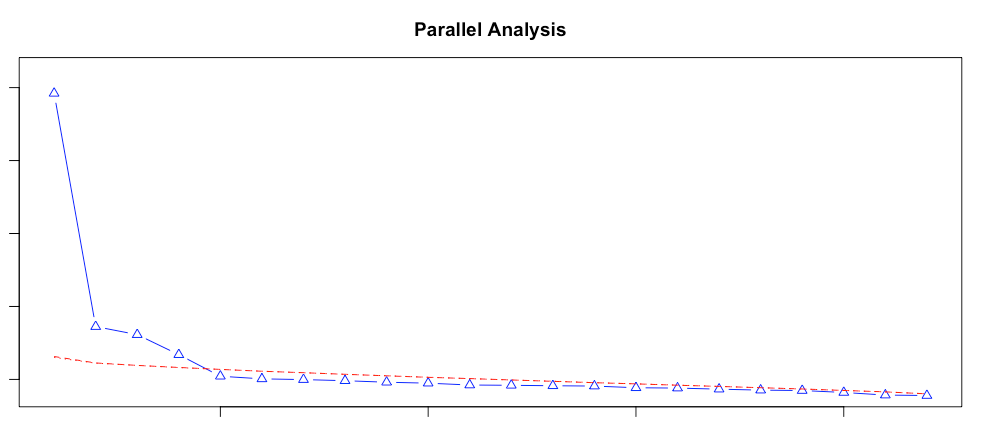
Parallel analysis suggests that the number of factors =  4  and the number of components =  NA
> pa_result$nfact
[1] 4
Parallel analysis offers another validation point by comparing the actual eigenvalues to those generated from random data with the same dimensions. This method confirms the presence of 4 meaningful factors, which strengthens confidence in this number since it agrees with the Kaiser criterion. The fact that both methods converge on the same answer suggests this is a robust finding rather than a statistical artifact.
> variance_explained[1:6]
[1] 0.3849310 0.4833719 0.5686769 0.6283131 0.6600193 0.6901751
The variance explained results show the cumulative explanatory power of these factors. The first factor alone captures 38.5% of the total variance in your survey responses, while the first two factors together explain 48.3%. When you include the third factor, you're capturing 56.9% of the variance, and all four factors together account for 62.8% of the total variation in the data.
This analysis suggests the survey data reveals 4 distinct underlying "jobs" or categories of needs that customers are trying to fulfill. Each factor likely represents a different dimension of customer motivation or desired outcome. The relatively high variance explained (62.8% with 4 factors) indicates these factors capture most of the meaningful patterns in your survey responses, giving you a solid foundation for understanding the different types of jobs your customers are hiring your product or service to do.
To continue with our analysis, next we will extract and rotate the factors
1# Extract 4 factors using maximum likelihood with varimax rotation
2fa_result <- fa(survey_data, nfactors = 4, rotate = "varimax",
3               fm = "ml", max.iter = 100)
Now that we know there are 4 underlying dimensions in the JTBD survey data, this code extracts those factors and makes them easier to interpret.
The fa() function performs the factor extraction using several key specifications. We are telling it to extract exactly 4 factors based on the previous analysis, ensuring consistency between the exploratory work and the final factor solution. The method uses maximum likelihood estimation (fm = "ml"), which is considered one of the most robust approaches for factor extraction because it provides better statistical properties and allows for significance testing of the factor loadings.
The varimax rotation (rotate = "varimax") is helpful for interpretation. Without rotation, factors can be difficult to interpret because variables often load substantially on multiple factors. Varimax rotation mathematically transforms the factors to maximize the variance of the squared loadings, which essentially means it tries to make each variable load highly on one factor and minimally on others. This creates cleaner, more interpretable factor patterns where each survey question is primarily associated with one underlying job or need.
The max.iter = 100 parameter sets the maximum number of iterations the algorithm can use to find the optimal solution, ensuring the process has enough computational cycles to converge on stable factor loadings.
Essentially this step transforms the survey data into 4 distinct, interpretable factors that represent different categories of customer jobs. Each factor will show which survey questions cluster together, helping you understand what needs or motivations define each job category. The varimax rotation ensures these job categories are as distinct and non-overlapping as possible, making it easier to develop targeted solutions for each type of customer need.
Now let's examine the factors
1print(fa_result$loadings, cutoff = 0.3, sort = TRUE)=== FACTOR LOADINGS ===
Loadings:
ML1 ML3 ML2 ML4
Organize_information 0.693
Document_information 0.573
Capture_ideas 0.655
Retrieve_information 0.514 0.329
Maintain_personal_records 0.655
Archive_completed_work 0.584
Cross_reference_information 0.672
Share_knowledge 0.674
Collaborate_content_creation 0.653
Coordinate_team_resources 0.676
Maintain_meeting_notes 0.718
Control_access_permissions 0.768
Manage_database_information 0.729
Create_custom_workflows 0.343 0.591
Visualize_data 0.748
Integrate_external_data 0.780
Plan_activities 0.679
Track_progress 0.323 0.598
Prioritize_tasks 0.639
Consolidate_work_resources 0.571
Set_reminders 0.345 0.540
Facilitate_decision_making 0.453
ML1 ML3 ML2 ML4
SS loadings 3.391 3.253 2.763 2.646
Proportion Var 0.154 0.148 0.126 0.120
Cumulative Var 0.154 0.302 0.428 0.548
>This output shows the factor loadings matrix, which is the heart of the factor analysis results. The loadings represent correlation coefficients between each job (survey question) and each of the four factors, with only values above 0.3 displayed to focus on the strongest relationships.
The structure reveals four distinct job clusters. Factor ML1 captures personal information management jobs, with strong loadings from tasks like organizing information (0.693), capturing ideas (0.655), and maintaining personal records (0.655). These jobs all relate to individual knowledge management and personal productivity needs.
Factor ML3 represents team collaboration and coordination, showing high loadings for sharing knowledge (0.674), coordinating team resources (0.676), maintaining meeting notes (0.718), and controlling access permissions (0.768). This factor clearly captures jobs related to working with others and managing shared resources.
Factor ML2 focuses on technical data management, with the strongest loadings coming from managing database information (0.729), visualizing data (0.748), and integrating external data (0.780). These jobs involve more sophisticated data handling and technical integration tasks.
Factor ML4 encompasses planning and task management activities, including planning activities (0.679), prioritizing tasks (0.639), and tracking progress (0.598). This represents project management and workflow optimization needs.
The summary statistics at the bottom show each factor's explanatory power. Factor ML1 has the highest sum of squared loadings (3.391) and explains 15.4% of the total variance. The factors collectively explain 54.8% of the variance in your survey data, which represents a solid factor solution that captures most of the meaningful patterns in customer job preferences.
1# Create comprehensive loadings table
2loadings_df <- data.frame(
3  Job = rownames(fa_result$loadings),
4  Factor1 = round(fa_result$loadings[,1], 3),
5  Factor2 = round(fa_result$loadings[,2], 3),
6  Factor3 = round(fa_result$loadings[,3], 3),
7  Factor4 = round(fa_result$loadings[,4], 3),
8  Communality = round(fa_result$communalities, 3)
9)
10
11# Identify primary factor for each job
12loadings_df$Primary_Factor <- apply(abs(fa_result$loadings), 1, which.max)
13loadings_df$Strength <- apply(abs(fa_result$loadings), 1, max)
14
15# Show complete loadings table
16loadings_dfJob Factor1 Factor2 Factor3 Factor4 Communality Primary_Factor Strength Organize_information Organize_information 0.693 0.162 -0.068 0.175 0.542 1 0.6933223 Document_information Document_information 0.573 0.278 0.278 0.249 0.545 1 0.5729458 Capture_ideas Capture_ideas 0.655 0.223 0.060 0.202 0.523 1 0.6551041 Retrieve_information Retrieve_information 0.514 0.329 0.300 0.172 0.492 1 0.5137683 Share_knowledge Share_knowledge 0.212 0.674 0.242 0.224 0.607 2 0.6736280 Maintain_personal_records Maintain_personal_records 0.655 -0.018 0.163 0.232 0.510 1 0.6554062 Archive_completed_work Archive_completed_work 0.584 0.205 0.261 0.204 0.493 1 0.5842493 Plan_activities Plan_activities 0.190 0.267 0.053 0.679 0.572 4 0.6792654 Track_progress Track_progress 0.323 0.124 0.284 0.598 0.558 4 0.5978025 Collaborate_content_creation Collaborate_content_creation 0.278 0.653 0.025 0.196 0.543 2 0.6532430 Manage_database_information Manage_database_information 0.146 0.106 0.729 0.092 0.572 3 0.7289425 Create_custom_workflows Create_custom_workflows 0.157 0.343 0.591 0.124 0.508 3 0.5914253 Coordinate_team_resources Coordinate_team_resources 0.203 0.676 0.227 0.210 0.594 2 0.6764126 Prioritize_tasks Prioritize_tasks 0.205 0.255 0.082 0.639 0.523 4 0.6394030 Facilitate_decision_making Facilitate_decision_making 0.161 0.294 0.298 0.453 0.406 4 0.4527065 Consolidate_work_resources Consolidate_work_resources 0.280 0.255 0.189 0.571 0.504 4 0.5707496 Visualize_data Visualize_data 0.137 0.171 0.748 0.063 0.612 3 0.7484466 Maintain_meeting_notes Maintain_meeting_notes 0.135 0.718 0.148 0.269 0.628 2 0.7178486 Integrate_external_data Integrate_external_data 0.100 0.091 0.780 0.114 0.639 3 0.7797904 Cross_reference_information Cross_reference_information 0.672 0.141 0.247 0.248 0.594 1 0.6722910 Set_reminders Set_reminders 0.345 0.127 -0.063 0.540 0.430 4 0.5398688 Control_access_permissions Control_access_permissions 0.072 0.768 0.174 0.172 0.656 2 0.7683490 >
This code creates an analysis table that transforms the raw factor loadings into a more practical format for understanding customer jobs. The data frame structures all the key information in one place, making it easier to interpret and act upon the factor analysis results.
The table reveals some different insights about how well each job is captured by the four-factor model. The Factor columns show the exact loading values for each job across all four factors, while the Communality column indicates how much of each job's variance is explained by the four-factor solution. Most communalities range from 0.4 to 0.7, suggesting the model captures a substantial portion of what drives customer preferences for these jobs. Values closer to 1.0 indicate better representation, while values below 0.3 might suggest the job doesn't fit well into any of the four categories.
The Primary_Factor and Strength columns provide immediate clarity about which factor dominates each job and how strong that relationship is. The code uses the which.max() function to automatically identify the factor with the highest absolute loading for each job, eliminating guesswork. For instance, "Integrate_external_data" has a strength of 0.780 and belongs primarily to Factor 3, making it a core defining job for the technical data management category. Similarly, "Control_access_permissions" shows a strength of 0.768 and belongs to Factor 2, indicating it's central to the collaboration factor.
Some jobs show interesting cross-factor relationships that merit attention. "Track_progress" loads on Factor 4 (0.598) but also has a notable loading on Factor 1 (0.323), suggesting it bridges personal productivity and project management needs. This kind of overlap indicates potential integration opportunities or explains why some customers might struggle to categorize certain needs cleanly. Jobs with secondary loadings (above 0.3) on multiple factors may represent complex needs that span categories.
The strength values also reveal hierarchy within each factor. In Factor 1 (personal information management), jobs like "Organize_information" (0.693) and "Cross_reference_information" (0.672) are much stronger than "Retrieve_information" (0.514), suggesting core versus supporting jobs within each category. This hierarchy can inform feature prioritization, with higher-strength jobs potentially deserving more development resources or prominence in the user interface.
The negative loadings, such as the -0.068 for "Organize_information" on Factor 3, indicate weak negative correlations. While not practically significant at such low values, larger negative loadings would suggest jobs that work in opposition to a particular factor. This comprehensive view helps analysts understand not just what belongs together, but also what distinctly separates different customer job categories.
For business applications, this analysis provides understanding customer job complexity. The communality scores help identify which jobs are well-understood by the current framework and which might need additional research. Jobs with lower communalities like "Facilitate_decision_making" (0.406) suggest there may be additional factors or nuances not captured in the four-factor model, pointing toward areas where customer needs might be more complex or context-dependent than initially apparent.
Next, let's evaluate the models fit.
> fa_result$RMSEA[1]

  RMSEA

0.0126198

> fa_result$TLI
> [1] 0.996014

> # Variance explained by the 4-factor solution
>
> if(!is.null(fa_result$Vaccounted)) {

- fa_result$Vaccounted[3, 4] # Cumulative proportion
- }
[1] 0.5478221
>
This code evaluates how well the four-factor model fits the actual survey data using several statistical measures that assess model quality. Model fit evaluation is crucial because it tells analysts whether the factor solution accurately represents the underlying structure in the data or if adjustments are needed.
The Root Mean Square Error of Approximation (RMSEA) value of 0.0127 indicates excellent model fit. RMSEA measures how well the model approximates the population, with values below 0.05 considered good fit and values below 0.08 acceptable. The extremely low RMSEA here suggests the four-factor model closely matches the actual correlation patterns in the data, with minimal approximation error.
The Tucker-Lewis Index (TLI) of 0.996 also demonstrates high model fit in this case. TLI compares the proposed model to a baseline model where all variables are uncorrelated, with values above 0.95 indicating excellent fit and values above 0.90 considered acceptable. A TLI of nearly 1.0 means the four-factor model explains the correlations among variables almost perfectly compared to assuming no relationships exist.
The cumulative proportion of variance explained is 0.548, meaning the four factors together account for approximately 54.8% of the total variance in the survey responses. This aligns with the earlier eigenvalue analysis and represents a substantial portion of customer job preferences being captured by these four underlying dimensions. While this leaves about 45% unexplained, this is typical for behavioral data where individual differences and measurement error contribute to variance.
Together, these fit indices provide strong statistical evidence that the four-factor solution is appropriate for the data. The low RMSEA and high TLI suggest the model structure is sound, while the variance explained indicates practical significance. For business applications, this means confidence that the four job categories identified genuinely reflect how customers think about and prioritize different types of work, rather than being statistical artifacts.
Factor Analysis Conclusion
To conclude, factor analysis from the simulated data reveals that Notion users naturally organize the platform's 22 functional capabilities into four distinct job categories, each representing a different approach to knowledge work. The clear factor structure suggests users have coherent mental models about how different capabilities relate to their workflows, rather than viewing each feature in isolation.
The analysis provides several implications for product teams. The hierarchy within factors indicates which jobs are core versus supporting within each category. For instance, organizing information and cross-referencing emerge as central to personal productivity, while data visualization and external integration define technical users. The moderate correlations between factors suggest opportunities for cross-selling users from basic personal productivity tools into more advanced collaboration or technical features.
The four-factor structure confirms that users prioritize jobs in patterns that match how they actually work.
This type of analysis becomes particularly valuable for platform products like Notion, where understanding user segments based on job complexity rather than demographics enables more targeted feature development and user experience optimization across different levels of technical sophistication and collaboration needs.
Key Takeaways
Start with what you already know. Before launching elaborate research studies, examine your existing data sources and talk directly with customers. Most teams can reach a high level of confidence about their core functional jobs through usage analytics, support tickets, customer feedback, and targeted stakeholder conversations. Quantitative validation often serves more to convince stakeholders than to uncover genuinely surprising insights.
Choose your research approach based on what you're trying to accomplish. If you're optimizing existing products, define jobs at a level matching your current capabilities and focus on friction points within that scope. If you're exploring new opportunities, consider broader job definitions that reveal adjacent markets and different approaches to serving customer needs.
Match your abstraction level to your audience. Different stakeholders need different flight levels to make decisions and take action. Executives benefit from higher-level perspectives that reveal market opportunities, while product teams need tactical specificity for feature development. Your job definition should serve the people who will use your research insights.
Use quantification methods strategically. MaxDiff analysis answers "which jobs matter most" and works well for roadmap prioritization. Factor analysis answers "how do jobs relate to each other" and helps identify user segments and natural product bundles. Choose the method that addresses your research questions rather than defaulting to what seems most sophisticated.
Keep the customer's perspective central. Your internal product categories and organizational structure shouldn't drive how you define jobs. Ground your job definitions in how customers actually think about and experience the work they're trying to accomplish. Their mental model of the complete job should guide your abstraction level and research boundaries.
Expect complexity and plan for it. Multi-purpose platforms, ecosystems, and products with broad capabilities will naturally serve multiple legitimate jobs for different user segments. This complexity requires systematic prioritization rather than oversimplification. Use the three-step approach of analyzing existing data, conducting targeted interviews, and selectively quantifying when you need stakeholder buy-in or want to understand user segments.
With a clearly defined core functional job that aligns with your research objectives and stakeholder needs, you're ready to move into the discovery phase of JTBD research. The job definition you've established will guide everything from participant recruitment to interview questions to analysis frameworks. This upfront investment in clarity pays dividends throughout the rest of your research process by ensuring every subsequent decision serves your ultimate goal of understanding what customers are really trying to accomplish.
Chapter Four Exercises
Linked here is a transcript of an interview with a YouTube Creator. Read through the interview transcript and see what different core functional jobs you notice throughout the interview.
References
[26]: Kalbach, Jim. The Jobs To Be Done Playbook: Align Your Markets, Organization, and Strategy Around Customer Needs. 1st ed., Two Waves Books, 2020. ISBN-13: 978-1933820682. Available on Amazon.
[27] Bezos, J. (2022). Jeff Bezos: Amazon and Blue Origin | Lex Fridman Podcast #405 [Transcript]. Lex Fridman. Retrieved from https://lexfridman.com/jeff-bezos-transcript/
[28] Ulwick, A. W. (2016). Jobs to Be Done: Theory to Practice. Paperback, October 28, 2016. Retrieved from https://www.amazon.com/Jobs-be-Done-Theory-Practice/dp/B0CCZV8JJH/
[29] Hair, J. F. Jr., Black, W. C., Babin, B. J., & Anderson, R. E. (2010). Multivariate Data Analysis (7th ed.). Retrieved from https://www.amazon.com/Multivariate-Data-Analysis-Joseph-Hair/dp/0138132631